| |
ID |
Date |
Author |
Subject |
|
|
Draft
|
Tue Jul 28 07:25:29 2026 |
Dylan Wells | Guide to Updating pueoSim | How To Update PueoSim For GENETIS:
First, whoever updates pueoSim needs access to pueoBuilder, pueoSim, and niceMC on GitHub (ask Will for permissions).
Once you do, go into the peuoSim directory at /fs/ess/PAS1960/buildingPueoSim/
and source set_env.sh
`source set_env.sh`
Then, we want to make copies of the files we are currently modifying for the GENETIS loop.
For PueoSim v1.1.0 these are:
-
nicemc/src/EventGenerator.cc # Modified to create custom output root files to calculate errors
-
pueosim/test/simulatePueo.cc # Modified to stop the simulation of the LF antenna which is not needed for GENETIS
-
pueosim/src/Seavey.cc # Modified to read in custom gain files
-
pueosim/src/pueo.cc # Modified to read in custom gain files
-
pueosim/include/Seavey.hh # Modifies to read in custom gain files
Currently, I store copies of these in the `/fs/ess/PAS1960/buildingPueoSim/backups` directory in case somebody accidentally overwrites the files in pueoBuilder.
Once you’ve made the copies, you can run `./pueoBuilder.sh` from the `/fs/ess/PAS1960/buildingPueoSim/pueoBuiler` directory. This will rebuild pueoSim and niceMC, pulling the latest updates from GitHub.
You may need to delete the pueoSim and niceMC directories in order for the builder to pull the latest version from GitHub. Or, if it’s being really stubborn, move the whole pueoBuilder directory to a temporary location and run the builder from scratch with
`git clone git@github.com:PUEOCollaboration/pueoBuilder` and then `./pueoBuilder.sh`
Then, you will need to reference the copies of the changed files to make changes to the new version of pueoSim. Hope this doesn’t cause too much of a headache, and when you’re done, return to the /fs/ess/PAS1960/buildingPueoSim/pueoBuiler directory.
Then you simply type
`make install`
then
`make`
And now, pueoSim should be ready to run!
EventGeneratior.cc Changes and Rationale:
PueoSim’s default output ROOT files are very large and therefore time-consuming to parse through to get the information we need to calculate effective volume and errors. So, we want to create a custom ROOT file with only the variables we want, greatly increasing the speed of the analysis.
To do this, we want to create a new TFile with corresponding TTree and TBranches that will store the loop.positionWeight, loop.directionWeight, and neutrino.path.weight. Then, we want to fill the Tree when a detector is triggered and write the results to the file at the end of the loop.
Sample code for initializing the TFile:

simulatePueo.cc Changes and Rationale:
By default, pueoSim v1.1.0 runs a simulation for the normal antenna and a low-frequency (LF) antenna. As GENETIS is evolving for the main antenna, we are not interested in using computation time to simulate the LF antenna. So, we comment out the lines that initialize the LF detector in this file.
Seavey.cc, Seavey.hh, and pueo.cc Changes and Rationale:
As of pueoSim v1.1.0, the simulation software only has the ability to read in one antenna. This is a problem, as we want it to be able to read in files for any antenna we make. So, we need to change these scripts to be able to read in whatever gain files we want.
The convention the loop uses is to input gain files in the format of
vv_0_Toyon{runNum}
hh_0_Toyon{runNum}
…
In the ./pueoBuilder/components/pueosim/data/antennas/simulated directory
So, the main change is getting the runNum variable into Seavey.cc file where the gains are read. Currently, we define a global variable at the stary of pueo.cc and pass it into where Seavey is called. This means we have to add runNum as a parameter in Seavey.cc as well as Seavey.hh. Finally, we change the name of the read-in files to be in the above format AFTER dividing runNum by 1000 (this is because pueoSim uses the run number as a random number generating seed, so we divide runNum by 1000 to be able to read in the same gain patterns for multiple seeds of the same individual).
Note: We used to change pueoSim to output a veff.csv file. We now handle this calculation by analyzing ROOT files, so this change is no longer necessary. |
|
|
Draft
|
Tue Jul 28 06:35:00 2026 |
Alex Machtay | Zoom training on XF 07/12/23 |
|
|
|
Draft
|
Sat Jul 25 11:15:41 2026 |
Ryan Debolt | Optimization Runs 6/12/2023 | All data and plots discussed in this post are taken from this spreadsheet:
https://docs.google.com/spreadsheets/d/1BbpD81mugWQf10ozGDLI60takAn3tlvrq8ksT10yV5I/edit?usp=sharing
Run Details:
This optimization run was done to do a course search for the optimal set of parameters to run the GA with. This run used a fixed 100-individual population with a simulated error of 0.25 over 50 generations, to best replicate the current PUEO-loop environment. The selection methods have also been held fixed in this run. This run was tested using both the ARA and PUEO design to see if there were similarities in the best run type. This run encompassed 210 different run combinations that searched the following parameter space:
- 0-16 Reproduction, step sizes of 4
- 72-96 Crossover, step sizes of 4
- 4-16 Mutation, step sizes of 4
- 5-15 Sigma, step sizes of 5
Results:
Each run combination was run 10 times and we tracked the average number of generations it took for the distance metric to reach 0.05, which corresponds to a 0.95 true fitness score. The best runs for each design were as followed:
- ARA
- Parameters
- 12 Reproduction
- 72 Crossover
- 4 Mutation
- 5 Sigma
- Average gens to benchmark
- Standard Deviation
- PUEO
- Parameters
- 0 Reproduction
- 96 Crossover
- 4 Mutation
- 15 Sigma
- Average gens to benchmark
- Standard Deviation
We can see that these run types do not appear to have any strong correlations. In fact, looking at our complete data set, there does not appear to be a strong trend around any of the best runs. This issue became more prominent when we ran these best two run types for 100 tests rather than 10. When we did this, they returned averages of 44.4 generations for PUEO and 46.9 generations for ARA. For comparison, the average number of generations across all run types was 43.1 generations for PUEO and 42.8 generations for ARA. This seems to suggest that all of these run types are inherently inconsistent and regress to the mean given enough tests. Therefore, I do not believe we can draw any conclusions from this run.
Moving Forward:
Our ongoing hypothesis is that the size of the error could be causing inconsistency in how quickly our population can grow over time. Therefore, our next step is to repeat this experiment, but with zero error included, and see if we achieve results that show consistent behavior. If we can find more consistency in runs with no error, then we can more deeply explore the effects that error can have on GA growth. If there continues to be a lack of consistency, then we can look to other factors, such as population size, and try to find the root of the inconsistency.
|
|
|
Draft
|
Sat Jul 25 08:14:17 2026 |
Ryan Debolt | Optimization Runs 6/12/2023 |
| Quote: |
|
All data and plots discussed in this post are taken from this spreadsheet:
https://docs.google.com/spreadsheets/d/1BbpD81mugWQf10ozGDLI60takAn3tlvrq8ksT10yV5I/edit?usp=sharing
Run Details:
This optimization run was done to do a course search for the optimal set of parameters to run the GA with. This run used a fixed 100-individual population with a simulated error of 0.25 over 50 generations, to best replicate the current PUEO-loop environment. The selection methods have also been held fixed in this run. This run was tested using both the ARA and PUEO design to see if there were similarities in the best run type. This run encompassed 210 different run combinations that searched the following parameter space:
- 0-16 Reproduction, step sizes of 4
- 72-96 Crossover, step sizes of 4
- 4-16 Mutation, step sizes of 4
- 5-15 Sigma, step sizes of 5
Results:
Each run combination was run 10 times and we tracked the average number of generations it took for the distance metric to reach 0.05, which corresponds to a 0.95 true fitness score. The best runs for each design were as followed:
- ARA
- Parameters
- 12 Reproduction
- 72 Crossover
- 4 Mutation
- 5 Sigma
- Average gens to benchmark
- Standard Deviation
- PUEO
- Parameters
- 0 Reproduction
- 96 Crossover
- 4 Mutation
- 15 Sigma
- Average gens to benchmark
- Standard Deviation
We can see that these run types do not appear to have any strong correlations. In fact, looking at our complete data set, there does not appear to be a strong trend around any of the best runs. This issue became more prominent when we ran these best two run types for 100 tests rather than 10. When we did this, they returned averages of 44.4 generations for PUEO and 46.9 generations for ARA. For comparison, the average number of generations across all run types was 43.1 generations for PUEO and 42.8 generations for ARA. This seems to suggest that all of these run types are inherently inconsistent and regress to the mean given enough tests. Therefore, I do not believe we can draw any conclusions from this run.
Moving Forward:
Our ongoing hypothesis is that the size of the error could be causing inconsistency in how quickly our population can grow over time. Therefore, our next step is to repeat this experiment, but with zero error included, and see if we achieve results that show consistent behavior. If we can find more consistency in runs with no error, then we can more deeply explore the effects that error can have on GA growth. If there continues to be a lack of consistency, then we can look to other factors, such as population size, and try to find the root of the inconsistency.
|
|
|
|
Draft
|
Tue Jul 21 22:12:47 2026 |
Dylan Wells | Line of Best-Fit Straightened Sides Antenna | Previously, we have tried to straighten the sides of the best-evolved curved antenna in elog 229. However, there were potential issues with how closely this line resembled the curve of the antenna.
So, I attempted to create another straightened sides antenna using a linear regression model to find the best fitting line for the curve to create an antenna.
I made a Python notebook to separate the equations for each curve into 1000 discrete points. Then I ran a linear regression model to fit a curve of the points 1 - n, and a second curve of the n - 1000 points, looping from n = 2 to n = 999.
These results are from the combined output with the least squared error compared to the original.
Pictured is a plot showing the two sides of the curved bicone in red and blue, with the best fitting lines for each in black as well as a model in XF.
Results:
The antenna has a fitness score of 3.80627 with an error of 0.0759725.
This is much lower than the 5.71 of the curved antenna and 5.11 of the other attempt at straightening.
For the next attempt, we could consider constraining the endpoints to be the same as the original antenna to conserve the radius, and/or adding an extra line to fit the curve.
I've also attached a picture of what my notebook found for fitting 3 lines to the curve (not modeled or tested).
Professor Chen recommended using 3 sides and constraining the outer radii of the cones to match the original curved design.
Path to linear regression notebook: /users/PAS1960/dylanwells1629/developing/notebook.ipynb
Path to XF project: /users/PAS1960/dylanwells1629/straightened.xf |
|
|
Draft
|
Sun Jul 19 18:24:33 2026 |
Alex Machtay | Zoom training on XF 07/12/23 |
|
|
|
Draft
|
Sat Jul 18 21:45:20 2026 |
Dylan Wells | Guide to Updating pueoSim | How To Update PueoSim For GENETIS:
First, whoever updates pueoSim needs access to pueoBuilder, pueoSim, and niceMC on GitHub (ask Will for permissions).
Once you do, go into the peuoSim directory at /fs/ess/PAS1960/buildingPueoSim/
and source set_env.sh
`source set_env.sh`
Then, we want to make copies of the files we are currently modifying for the GENETIS loop.
For PueoSim v1.1.0 these are:
-
nicemc/src/EventGenerator.cc # Modified to create custom output root files to calculate errors
-
pueosim/test/simulatePueo.cc # Modified to stop the simulation of the LF antenna which is not needed for GENETIS
-
pueosim/src/Seavey.cc # Modified to read in custom gain files
-
pueosim/src/pueo.cc # Modified to read in custom gain files
-
pueosim/include/Seavey.hh # Modifies to read in custom gain files
Currently, I store copies of these in the `/fs/ess/PAS1960/buildingPueoSim/backups` directory in case somebody accidentally overwrites the files in pueoBuilder.
Once you’ve made the copies, you can run `./pueoBuilder.sh` from the `/fs/ess/PAS1960/buildingPueoSim/pueoBuiler` directory. This will rebuild pueoSim and niceMC, pulling the latest updates from GitHub.
You may need to delete the pueoSim and niceMC directories in order for the builder to pull the latest version from GitHub. Or, if it’s being really stubborn, move the whole pueoBuilder directory to a temporary location and run the builder from scratch with
`git clone git@github.com:PUEOCollaboration/pueoBuilder` and then `./pueoBuilder.sh`
Then, you will need to reference the copies of the changed files to make changes to the new version of pueoSim. Hope this doesn’t cause too much of a headache, and when you’re done, return to the /fs/ess/PAS1960/buildingPueoSim/pueoBuiler directory.
Then you simply type
`make install`
then
`make`
And now, pueoSim should be ready to run!
EventGeneratior.cc Changes and Rationale:
PueoSim’s default output ROOT files are very large and therefore time-consuming to parse through to get the information we need to calculate effective volume and errors. So, we want to create a custom ROOT file with only the variables we want, greatly increasing the speed of the analysis.
To do this, we want to create a new TFile with corresponding TTree and TBranches that will store the loop.positionWeight, loop.directionWeight, and neutrino.path.weight. Then, we want to fill the Tree when a detector is triggered and write the results to the file at the end of the loop.
Sample code for initializing the TFile:
simulatePueo.cc Changes and Rationale:
By default, pueoSim v1.1.0 runs a simulation for the normal antenna and a low-frequency (LF) antenna. As GENETIS is evolving for the main antenna, we are not interested in using computation time to simulate the LF antenna. So, we comment out the lines that initialize the LF detector in this file.
Seavey.cc, Seavey.hh, and pueo.cc Changes and Rationale:
As of pueoSim v1.1.0, the simulation software only has the ability to read in one antenna. This is a problem, as we want it to be able to read in files for any antenna we make. So, we need to change these scripts to be able to read in whatever gain files we want.
The convention the loop uses is to input gain files in the format of
vv_0_Toyon{runNum}
hh_0_Toyon{runNum}
…
In the ./pueoBuilder/components/pueosim/data/antennas/simulated directory
So, the main change is getting the runNum variable into Seavey.cc file where the gains are read. Currently, we define a global variable at the stary of pueo.cc and pass it into where Seavey is called. This means we have to add runNum as a parameter in Seavey.cc as well as Seavey.hh. Finally, we change the name of the read-in files to be in the above format AFTER dividing runNum by 1000 (this is because pueoSim uses the run number as a random number generating seed, so we divide runNum by 1000 to be able to read in the same gain patterns for multiple seeds of the same individual).
Note: We used to change pueoSim to output a veff.csv file. We now handle this calculation by analyzing ROOT files, so this change is no longer necessary. |
|
|
Draft
|
Sat Jul 18 09:39:19 2026 |
Dylan Wells | Instructions for Running IceMC |
| Quote: |
|
Running IceMC:
Go into the directory ../anitaBuildTool/build/components/icemc/
And run the command
*May need to chmod -R 775 ../anitaBuildTool/comonents/icemc/ if you get a permissions error
inputFile:
Must be the full path to the file
Config files are found in ../anitaBuildTool/components/icemc
Ex: /users/PAS1960/dylanwells1629/anitaBuildTool/components/icemc/inputs.anita4.conf
Config files are found in ../anitaBuildTool/components/icemc
outputDirectory:
Will be made in ../anitaBuildTool/build/components/icemc/ by default, specify full path otherwise.
runNumber:
The run number.
numberOfNeutrinos:
The number of neutrinos generated in the simulation.
Can be found in inputs.conf
Default is 2,000,000.
#How many neutrinos to generate
triggerThreshold:
Threshold for each band for the trigger.
Default is 2.3
#thresholds for each band- this is only for the frequency domain voltage trigger. If using a different trigger scheme then keep these at the default values of 2.3 because the max among them is used for the chance in hell cuts
energyExponent:
The exponent of the energy for the neutrinos
Can be found in input.conf
Default is 1020
# Select energy (just enter the exponent) or (30) for baseline ES&S (1) for E^-1 (2) for E^-2 (3) for E^-3 (4) for E^-4 (5) for ES&S flux with cosmological constant (6) for neutrino GZK flux from Iron nuclei (16-22)not using spectrum but just for a single energy (101-114)use all kinds of theoretical flux models
|
|
|
|
Draft
|
Fri Jul 17 12:08:19 2026 |
Julie Rolla | GENETIS Working Meeting | Today's Tasks
Julie: Write Python project! I have officially finished the bash course for the students. It can be found here: https://docs.google.com/document/d/1nGdPrwfYJOrO6NBT76Wsh6T0hDmGHo2-23oJ1WyeNcs/edit?usp=sharing. Mitchell is currently trying it out and will give me comments.
Mitchell: Work through my bash project and give me comments!
Evelyn, Eliot, Ryan: Make progress on the "Learn the Command Line" course on Code Academy.
Leo: continuing gathering information for the "physics of antennas" lecture series! These will take place every Friday meeting starting next week.
Alex M: Try to get scaling into the xmacro, comment the code better.
Alex P: Add on the AraSim fixes mentioned below!
TO-DO List
The following is our coding to-do list:
-
Get our Ara sim errors fixed
-
Explanation of issue (1): Usually 1 of ~100 AraSim jobs never completes. OSC shows "completed", but the flag is never written and the output file is not filled in entirely. The error file shows the following.
-
Carl believes this is due to the way we are saving our AraSim outputs. Instead of saving the files directly to our desired location, we are going to save them to $TMPDIR and use "pbsdcp" to copy them from $TMPDIR to our desired location. This may alleviate the problem since it will not be writing all the files to our desired location at once.
DATA_LIKE_OUTPUT=1,2 doesn't work with DETECTOR=0,1,2
DATA_LIKE_OUTPUT controls data-like output into UsefulAtriStationEvent format; without a real station selected (using DETECTOR==3,4), the mapping to the data-like output will not function correctly
There are 1 errors from settings. Check error messages.
SysError in <TFile::Flush>: error flushing file outputs/AraOut.setup.txt.run29.root (Stale file handle)
- Explanation of issue (2): We keep timing out of the interactive job when AraSim is running (if the user isn't remaining active on their terminal).
- OSC suggested that we use a virtual desktop (via ondemand) insead of using an interactive job. We will try this.
- Note: We should now be requesting 2GPUs instead of 1GPU.
-
Make the following variables in the bash script.
-
Alex M is working on this. We can't directly make this a variable. We need to take the array of frequencies and multiply it by some value and THEN feed it into the xmacro. He is looking into whether of not he can directly do this in bash. If not, I have written a small python script that does this, and he can write it to that file; however, he can't append it at the end so it's not the ideal way. We are going to continue to try to do it through bash first.
In xmacros/simulationPECmacroskeleton_prototype.txt (use sed command):
Grid spacing=0.1
Frequency= factor of n higher
This factor of "n" higher in frequency has to be the same as the Multiplier_factor in the roulette algorithm AND the same as GeoFactor in fitnessFunction_ARA_amy.cpp.
-
Turn tournament on in the GA.
-
Parallelize the AraActualBicone job.
-
The AraSim run in Gen 0 that gets Veff for the ARA actual bicone input file is not currently being parallelized.
-
Comment code thoroughly
-
The Gen alg is commented so thorougly that it can read like a book. We want this with ALL of our code; it will help all the less familiar people get comfortable.
|
|
|
Draft
|
Tue Jul 14 00:15:42 2026 |
Alex M | GENETIS Update 9/14/20 | I just wanted to give an update on what I've been doing today for GENETIS. I went ahead and recorded myself running the loop. It should be useful for new people we're onboarding but I also went through a whole generation, which I think is interesting for everyone to understand the timescale of each part of the loop. I'm making a small edit (I have no clue how to edit videos haha) so once I'm done I'll try to send it via email and post it on slack. I also started a long run Amy requested using antennas which are asymmetric in length and opening angle and 50 individuals per generation. Since it has so many individuals it will take a long time to go through each generation. I also had to decrease the number of AraSim jobs (thus increasing the number of neutrinos per job) because otherwise we'd be submitting too many jobs and have a lot of them blocked, holding us back from running. If anyone has problems with me using up too many jobs let me know and I can try to decrease the numer of jobs per individual futher (right now I have 10 jobs per individual with 3000 neutrinos per job, which gives us 500 AraSim jobs per generation). |
|
|
Draft
|
Mon Jul 13 18:50:41 2026 |
Ryan Debolt | Optimization Runs 6/12/2023 | All data and plots discussed in this post are taken from this spreadsheet:
https://docs.google.com/spreadsheets/d/1BbpD81mugWQf10ozGDLI60takAn3tlvrq8ksT10yV5I/edit?usp=sharing
Run Details:
This optimization run was done to do a course search for the optimal set of parameters to run the GA with. This run used a fixed 100-individual population with a simulated error of 0.25 over 50 generations, to best replicate the current PUEO-loop environment. The selection methods have also been held fixed in this run. This run was tested using both the ARA and PUEO design to see if there were similarities in the best run type. This run encompassed 210 different run combinations that searched the following parameter space:
- 0-16 Reproduction, step sizes of 4
- 72-96 Crossover, step sizes of 4
- 4-16 Mutation, step sizes of 4
- 5-15 Sigma, step sizes of 5
Results:
Each run combination was run 10 times and we tracked the average number of generations it took for the distance metric to reach 0.05, which corresponds to a 0.95 true fitness score. The best runs for each design were as followed:
- ARA
- Parameters
- 12 Reproduction
- 72 Crossover
- 4 Mutation
- 5 Sigma
- Average gens to benchmark
- Standard Deviation
- PUEO
- Parameters
- 0 Reproduction
- 96 Crossover
- 4 Mutation
- 15 Sigma
- Average gens to benchmark
- Standard Deviation
We can see that these run types do not appear to have any strong correlations. In fact, looking at our complete data set, there does not appear to be a strong trend around any of the best runs. This issue became more prominent when we ran these best two run types for 100 tests rather than 10. When we did this, they returned averages of 44.4 generations for PUEO and 46.9 generations for ARA. For comparison, the average number of generations across all run types was 43.1 generations for PUEO and 42.8 generations for ARA. This seems to suggest that all of these run types are inherently inconsistent and regress to the mean given enough tests. Therefore, I do not believe we can draw any conclusions from this run.
Moving Forward:
Our ongoing hypothesis is that the size of the error could be causing inconsistency in how quickly our population can grow over time. Therefore, our next step is to repeat this experiment, but with zero error included, and see if we achieve results that show consistent behavior. If we can find more consistency in runs with no error, then we can more deeply explore the effects that error can have on GA growth. If there continues to be a lack of consistency, then we can look to other factors, such as population size, and try to find the root of the inconsistency.
|
|
|
Draft
|
Mon Jul 13 06:51:38 2026 |
Julie Rolla | GENETIS Planning Meeting | Attendance: Julie Rolla, Alex M.
Today Alex and I met to discuss how to move forward given the COVID-19 restrictions. We have resent out a message polling people's schedules to create online working sessions. Here is what we are planning:
| Group name |
Tasks |
Participants |
Times per week to meet |
| Loop Group |
Running the loop, updating software, getting plots |
Julie, Alex M., Alex P. |
2 |
| Lecture |
Attend Leo's lectures |
Full group |
1 |
| Training (Python, c++, and Bash projects) |
Completing the training modules (Alex M. and Julie will be answering questions) |
Mitchell, Ryan, Evelyn, Eliot, Julie, Alex M. |
2 |
Once we collect times for each group, we will have separate meetings for all of these entities. This way it's easier for us to meet without all having different items to discuss/work on. All of these will be zoom meetings moving forward. Meeting info will be announced shortly!
Tasks for "the Loop Group":
- Make wall time a variable for XF sim.
- Test current software edits.
- Such as item #1 above
- Make sure the bottleneck function is working.
- Right now it seems to be working; however, we keep hitting a wall time error. If we can make the wall time a variable then we can be sure the bottleneck function is working, and the wall time is truly the error.
- Get Ruby working on XF
- when I type:
/usr/local/xfdtd/7.8.1.4/remcom/bin/xfdtd I get:
Info: Using latest available version (7.8.1.4)
Info: Running /usr/local/xfdtd/7.8.1.4/remcom/XFdtd_7.8.1.4/bin/xfdtd
Error: Unable to find executable to run.  This command must exist
- Get Alex's account of Ruby working.
- He received an email and is still unable to log in. He is touching base with them again.
Tasks for "the Training Group":
- Julie and Alex need to finish the C++ project!
|
|
|
Draft
|
Fri Jul 10 13:07:59 2026 |
Ryan Debolt | Fitness Functions Test | Bellow lies plots testing different scores and comparing them using a chi^2 score.
The functions used are as follows
Gaussian: e^(-2) (Red)
Inverse: 1/(1+(O-E)^2) (Purple)
Algebraic: 1/(1+(chi^2) )^(3/2)) (Green)
Chi: 1/(1+chi^2) (Blue)
Which are plotted here:

|
|
|
Draft
|
Thu Jul 9 19:23:25 2026 |
Julie Rolla | 3/5 Task Updates | Tue Mar 5 17:29:02 2019
The things we worked on this week is in bold. Below the bold items is a description of exactly what we took care of.
- Paper:
- Julie added Amy's edits.
- Julie let Kai know he is welcome to edit, too.
- Julie will also keep edits updated as they come in!
- Get loop working-- specifically XF:
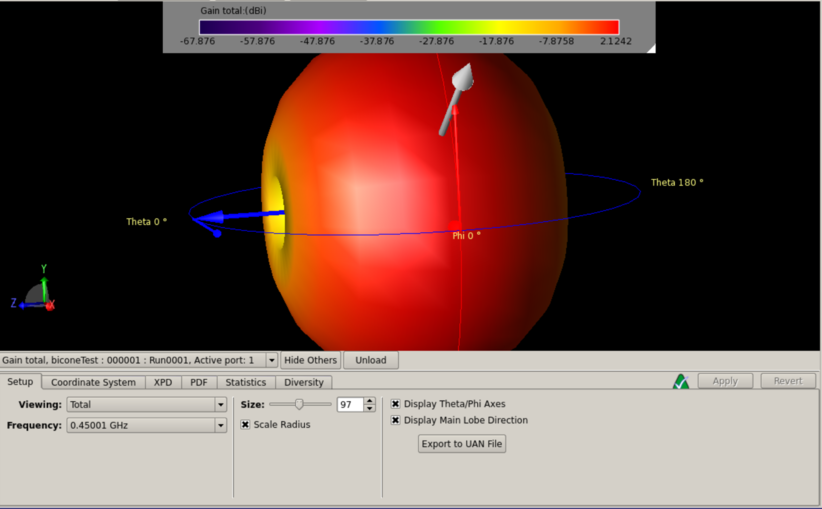
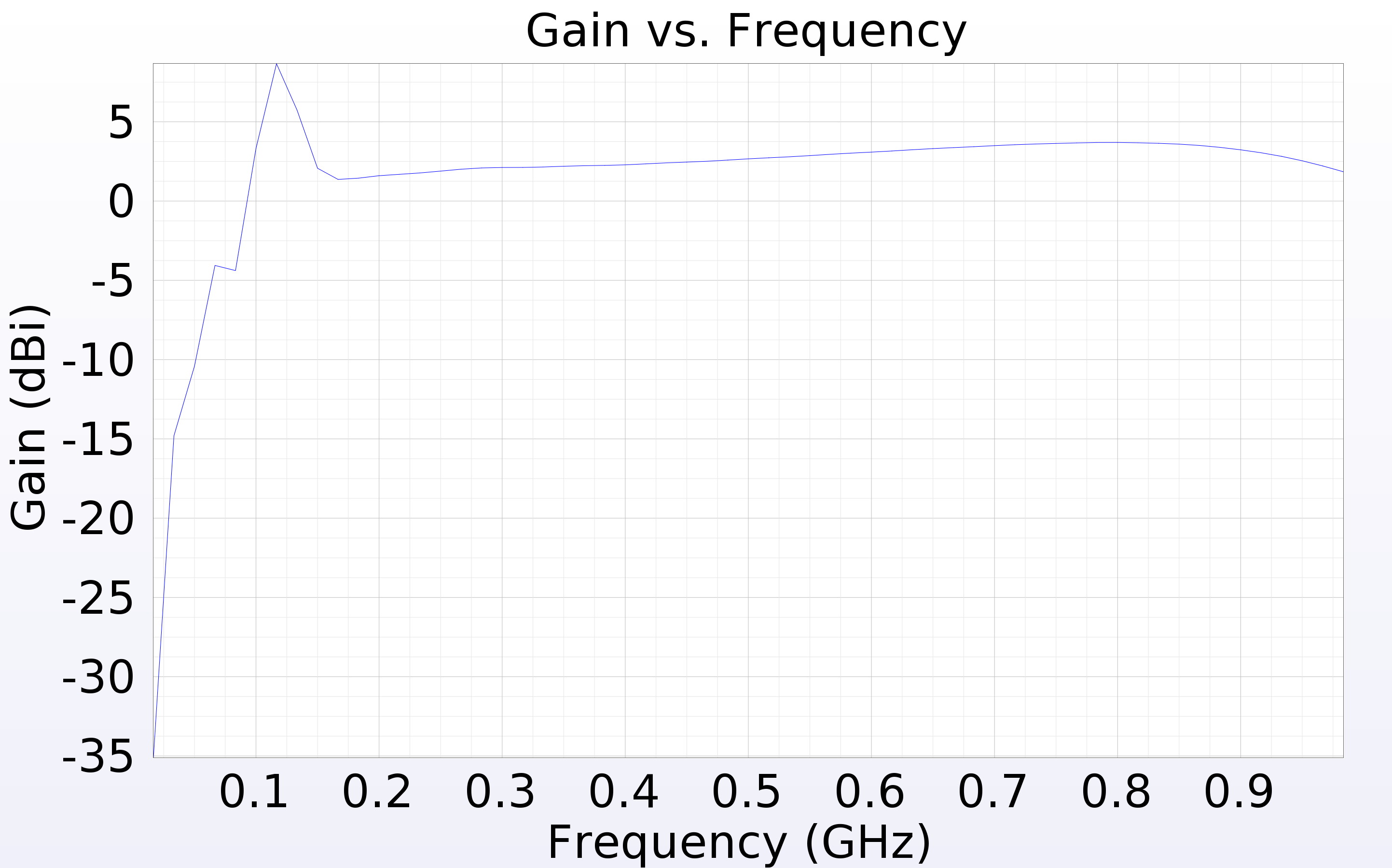
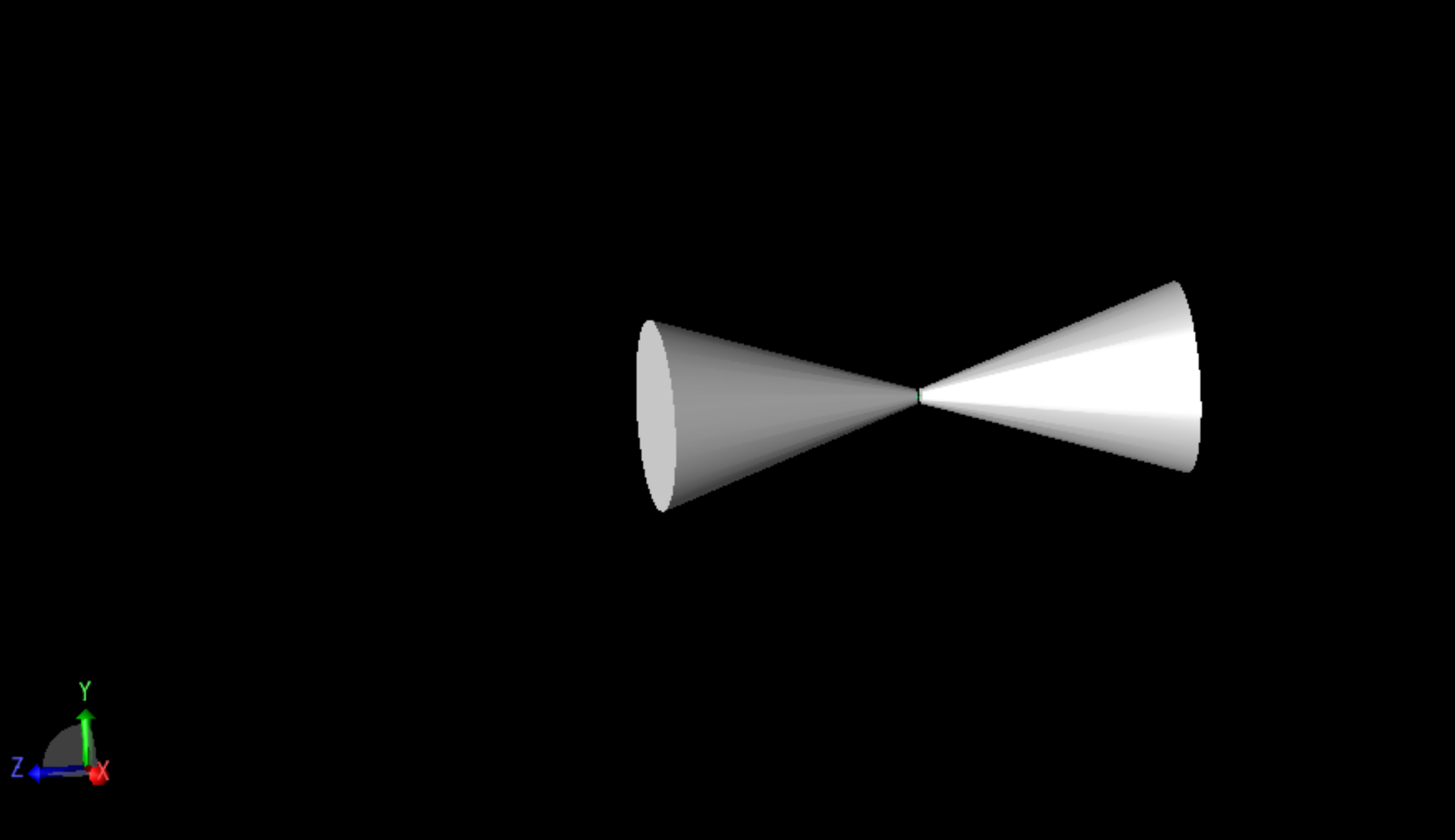
- Cade has now officially gotten reasonable outputs for his XF scripts. See the attached images for the XF outputs and associated CAD drawing. It seems to look like a reasonable gain pattern.
- The loop now works until AraSim. We are now getting the following AraSim errors:
- XF_Loop.sh: line 244: ./AraSim: No such file or directory
- XF_Loop.sh: line 244: ./AraSim: No such file or directory
- Julie is going to help Cade make sure that this directory is correct and that it has been compiled! More info to come.
- Test GA (Suren):
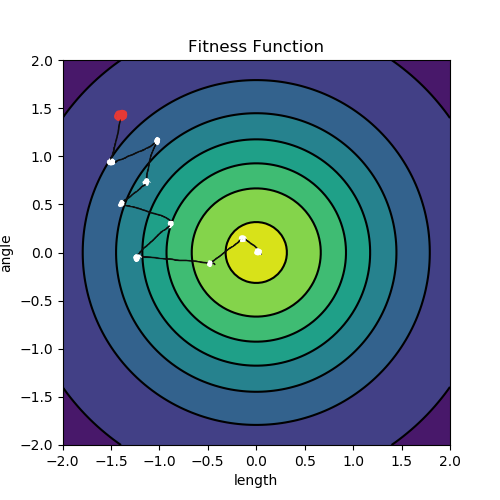
- I've been working on creating a gaussian fitness score with which I can test the performance of our genetic algorithm. The idea is as follows: We run the GA and get a generation of individuals. We provide their fitness score by simply taking the values {radius, length, angle} as the {x, y, z} coordinate in a 3D space. We can then use a 3D gaussian to output a value at that location, and use that number as our fitness score. The beauty of this method is that we can then plot the progress of our genetic algorithm each generation as a dot in this 3D space, and we can see it slowly snake to the center. Additionally, we can use more complex fitness scores, like one with a local maxima and a global maxima to see if it get's stuck in the local maxima. Below, I have an image I generated on python of a 2D section contour plot of a 3D gaussian in length-angle space. The dark purple is a lower value and the yellow is a higher value of the gaussian. The lines and dots hand-drawn on top are an idea of what it would look for like to start the GA at the red dot and see it's progress each generation until it reaches the center, shown by the white dots. Running this for our current roulette algorithm would make a very nice GA proof of concept plot for the paper, I believe!
- Gain pattern plots -- Make them 3D (Evelyn) & put on GitHub
- We need to figure out how to make a group Github. We have a lot of Githubs made by people and we need them all accessible from a group account. Right now the old dipole Github and the CalPoly stuff are linked to a group account. We need to find out how to get the Bicone account held by Max, and Evelyn's plotting code all on the group account: https://github.com/gp-antennas.
- Update: Evelyn and Max have contacted Brian to get their accounts linked. It looks like Amy, Brian, and Stephanie (Cal Poly) are the owners.
- Insert LR plot & Gain plot to loop (?)
- Edit bash script
- Update Github
- AraSim plots (Julie and Max) -- see #2 and #3 here: http://radiorm.physics.ohio-state.edu/elog/GENETIS/7 for details.
- Max and Julie have gotten sample data on Owens.
- located at /users/PCON0003/cond0068/ARA/AraSim/branches/AraSimLite/outputs
- Max and Julie have gotten sample programs from Jorge.
- https://github.com/toej93/AraSim_noise_calib/blob/master/readTree.cc
- https://github.com/toej93/AraSim_noise_calib/blob/master/M.readTree
- Julie installed root, and had Max source Julie's thisroot.sh files to run root on Owens.
- Max installed Arasim to his user.
- Next step: run plotting software given by Jorge.
- Update manual with things from Suren's last post here: http://radiorm.physics.ohio-state.edu/elog/GENETIS/8
|
|
|
Draft
|
Mon Apr 20 02:05:11 2026 |
Alex M | Daily Update 7/23/20 |
| Quote: |
| Name |
Update |
Plans for Tomorrow |
| Alex M |
Leo and I continued working on the roulette algorithm for the asymmetric bicone to try to get the evolved generations to match the original and database ones. We went through the mutation part of the algorithm and made sure we were rrunning all of the random number sequences in the correct order (for example, we need to make sure that if we define variables A and B from a random number generator, that in both cases we define A first, then B). We also had to make sure that we were using these random sequences the same number of times (for example, we don't want to define A once in the original/database versions and twice in the asymmetric version when the asymmetric version is set to evolve symmetric antennas--this puts the random number generator "off sequence" relative to how it is in the original/database version). We tested this with the gen 0 DNA and effective volumes (which matched with the results from the original/database runs) to evolve generation 1 and got it to match. I'm currently running the loop to test this over multiple generations.
Julie and I met with Ben to talk about AREA. Yesterday, Ben was able to generate the 0th generation of individuals and then run AraSim from a job to get effective volumes. Today, we focused on editing the scripts to work for OSC job submissions (he wrote the one he used yesterday; we modified the main script today and will continue to do so). We edited it so that we could submit the main script as a job which then submits other jobs for the arasim portion and waits for those jobs to finish before continuing on (since it needs those effective volumes for its fitness score). We're going to keep incrementally fixing the main script so that it can run over multiple generations as a job submission without errors.
|
I have a doctor's appointment in the morning, but maybe Leo can continue my current run. Once it's done, optimally we would work with Julie to get everything merged so that we can start a real run (we also have to implement the changes I outlined in the ELOG post a couple days ago before we do a real run/merge--most of those are pretty simple).
Julie and I will take a look at the paperclip script Ryan's been writing to see if we can help him figure out why the roulette algorithm is giving such worse fitness scores than the tournament algorithm (~ fact of 2 worse).
|
| Alex P |
|
|
| Eliot |
|
|
| Leo |
Alex covered it above for the most part. I just worked with him today trying to correct roulette so we get the same DNA for gen 1. Just to reiterate, the last step that was hanging us up was making sure the new GA used the random number generator the same amount of times and in the same order as the old GA. After that, Alex started another run to make sure everything is running smoothly. |
Tomorrow, Alex and I will make sure the results for the first few generations match. Then, Alex, Julie and I will move on to merging. |
| Evelyn |
|
|
| Ryan |
|
|
| Ben |
|
|
| Ethan |
|
|
|
|
|
|
Draft
|
Mon Apr 20 01:57:35 2026 |
Julie Rolla | ONBOARDING: Tutorial Projects, Reading, Setup, etc. for New Students |
| Quote: |
|
For each new student joining the group, we ask them to onboard by completing each of the following items in the order given:
(1) Go to osc.edu and request an account
(2) Complete the following tutorials and reading. Note that the order of these does not matter, however, I would suggest "how to use Git" comes last, as it is the lease important for you to start. Finally, I advise you work on a tutorial concurrently with reading the pages assigned below from my Dissertation.
- OSC tutorials
- Because this project uses a lot of computation power, we run on the Ohio Super Computing Center's clusters. Please utilize these tutorials to learn more.
- Read Julie's Dissertation pages 1-9, 12-20 (starting at section 1.5.2), 28-37 (starting at section 2.3)
- Feel free to read chapter 3, as it has the history of this project and goes into details of our most up-to-date endeavors. This is optional and not mandatory.
- Complete the introduction to Bash project
- Complete the introduction to Python Project
- How to use Git (optional)
- Make sure to get an XFdtd license on OSC
(3) Finally, review the full manual and complete the bullets below. The full manual is Appendix A of Julie's Dissertation.
- Appendix A of my dissertation is our manual and acts as the holy grail of our research. Anything you need can be found here (from where our info exists on the web, to how to run the code).
- Once you have read this through entirely, we advise you log on to OSC and explore the code for PAEA in PAS1960. Once you have done so, complete this homework by making a copy of this google doc and filling it out on your own.
Once these are completed, the students are ready to start helping. This is all of the coding information and basic background information on evolutionary algorithms students must know to be proficient in assisting.
Other useful materials we have may include:
- Our old GENETIS manual
- This is somewhat out of date; however, it does have information on the general working on the loop.
- Julie's candidacy paper
- Complete the writing a genetic algorithm in C++ project
- This is still a work in progress! I'll complete it shortly!
- Read chapter 3 of this book (more if you have time) by Eiben and Smith, "Introduction to Evolutionary Computation" for a quick introduction. The book should be available electronically from a university library. Let us know if you can't find it there.
- Get to know XFdtd
- XFdtd manual is also attached; however, the link above (in 5) is more useful for coding a .xmacro.
Important notes:
MAC USERS: Using a GUI when connecting to OSC via SSH from your terminal.
You will need to set up X11 forwarding. Otherwise, when you go to plot via SSH, they will not display (they don't forward from OSC to your machine). If you are unable to run GUI's on OSC through your computer's terminal, follow these instructions:
- In your own system's terminal, type: sudo vi /etc/ssh/sshd_config
- Search for the following line: X11Forwarding no
- Change it to: X11 Forwarding yes. Save the file and exit.
- In your own system's terminal, type: sudo systemctl restart sshd
- For a Mac, download and install XQuartz.
- Connect to OSC using ssh -XY username@hostname.
- You can test that this works by typing 'xeye' or 'xclock' in the terminal when logged into OSC.
Now you should be able to use OSC's GUIs.
PC USERS:
As a PC user, there are a few things you need to do:
(1) Enable the Windows Subsystem for Linux on your device (https://developerinsider.co/stepwise-guide-to-enable-windows-10-subsystem-for-linux/#:~:text=To%20enable%20the%20Windows%20Subsystem,list%20here%20and%20click%20OK.)
(2) Get Bash on Ubuntu installed on your machine. You are going to need to have Bash on Ubuntu installed prior to starting these trainings; otherwise Bash commands will not be recognized.
(3) Get X11 forwarding working. Otherwise, when you go to plot via SSH, they will not display (they don't forward from OSC to your machine).
- Follow these steps here.
- Change your config file. To do so, in terminal (with Bash on Ubuntu open)
- type: sudo vi /etc/ssh/sshd_config
- Then change '#X11Forwarding no' to '#X11Forwarding yes' and save it.
- Make sure Putty and Xming are running every time before you ssh in. Use Xlaunch application to run Xming and press yes to everyrthing.
- Xming should now be running as a background task.
- Open PuTTY and open the pre-saved like you saved in PuTTY. (This will open a Bash terminal that asks for your OSC login password.)
|
|
|
|
Draft
|
Mon Apr 20 00:59:46 2026 |
Julie Rolla | GENETIS Working Meeting |
| Quote: |
|
Today's Tasks
Julie: Write bash practice assignment, assist others when they have questions, work on Git lecture. (Will finish bash assignments early next week)
Evelyn, Mitchell, Eliot: Make progress on the "Learn the Command Line" course on Code Academy. (Should be done by the end of the week?)
Leo: Start gathering information for the "physics of antennas" lecture series! Note: Remember that Leo wants to be an educator, and would like us to find opportunities to work on "teaching" items. Most of the students don't have any background on how antennas work. He started learning about them and is going to do a lecture series (likely the first 20 minutes of every meeting) starting in a few weeks! (Should start series by hopefully 2/21)
Alex M: Clean up unused code. Fix hard-coded directories (likely finished & tested by end of day 2/11)
Alex P: Fix hard-coded variables (likely finished & tested by end of day 2/11)
I've tacked on our to-do list in the meantime so we can keep carrying the items still pending along with us. As we complete them, I will drop them off the list!
TO-DO List
The following is our coding to-do list:
-
Get our Ara sim error fixed (Alex, Julie)
-
It seems that if AraSim jobs are left to run while the user is away, it doesn't properly write one or more of the flags, and makes the loop get stuck at AraSim. We must then re-run from that state by manually editing the Save State text file.
-
We are going to try to get XF to run at the command line so that we can submit it as a job. This would alleviate us using an interactive job. We *hope* this would fix the error since the user wouldn't be "gone" while utilizing a GPU in an interactive job.
-
Alex emailed XF to ask a few questions! Stay tuned!
-
Make Hardcoded directories variables.
-
Xmacros (use sed command)
-
All over bash script functions.
-
AraSim job files (sed command?)
-
Make the following variables in the bash script:
In xmacros/simulationPECmacroskeleton_prototype.txt (use sed command):
Grid spacing=0.1
Frequency= factor of n higher
This factor of "n" higher in frequency has to be the same as the Multiplier_factor in the roulette algorithm AND the same as GeoFactor in fitnessFunction_ARA_amy.cpp.
In roulette_algirithm.cpp
Length = 50cm/Multiplier_factor;
STD= 15cm/Multiplier_factor
Radius = 1.5cm/Multiplier_factor;
STD= 0.75cm/Multiplier_factor
Also the "Multiplier_factor" line 89.
This "Multiplier_factor"has to be the same as the GeoFactor in fitnessFunction_ARA_amy.cpp AND the same as the factor higher in frequency in the xmacro.
NOTE:THIS MUST BE RECOMPILED AFTER CHANGING.
In fitnessFunction_ARA_amy.cpp:
GeoFactor=2
This GeoFactor has to be the same as the Multiplier_factor in the roulette algorithm AND the same as the factor higher in frequency in the xmacro
NOTE: THIS MUST BE RECOMPILED AFTER CHANGING.
-
Get rid of all code we are not using anymore.
-
Currently using: XF_loop_AraSeed.sh
-
Look at what items are being called in here, and remove old versions such as XF_loop_Prototype.sh, XF_loop_Functionized.sh, and the related scripts.
-
These can temporarily moved to on "old code" directory and we can delete once we finalize the loop.
-
Turn tournament on in the GA.
-
Parallelize the AraActualBicone job.
-
The AraSim run in Gen 0 that gets Veff for the ARA actual bicone input file is not currently being seeded.
|
|
|
|
Draft
|
Mon Apr 20 00:52:34 2026 |
Alex M | Daily Update 8/3/20 |
| Quote: |
| Name |
Update |
Plans for Tomorrow |
| Alex M |
I fixed the issues I outlined a little while ago that we needed to resolve before starting a real run. I started a real run with 10 individuals for up to 20 generations using the database for a symmetric bicone. The name of the run is Machtay_20200803_Master_Symmetric_Database_Real (whew!). Right now it's on gen 2 and plots are on drop box (see the link at the bottom). |
I'm going to keep the run going and hopefully be most of the way to 10 generations by the end of tomorrow. Julie and I also discussed some potential improvements that can be made to the loop. For one, there's some consolidation and cleaning up that should be done of the main directory. We were also speculating about a way that we could quickly see when AraSim jobs fail and rerun them in real time rather than waiting for all the jobs to finish to realize we need to rerun. |
| Alex P |
|
|
| Eliot |
|
|
| Leo |
|
|
| Evelyn |
|
|
| Ryan |
Continued working on the bash script to automate runs for paperclips. |
Finish the bash script and do the runs and start combing through the results. |
| Ben |
|
|
| Ethan |
|
|
Dropbox link: https://www.dropbox.com/home/GP_Antennas/Updates/DailyFitnessScoreImages/Machtay_20200803_Master_Symmetric_Database_Real
|
|
|
|
Draft
|
Sun Apr 19 18:00:16 2026 |
Alex Patton | Daily GENETIS Update 6/5/20 |
| Quote: |
| Name |
Today's Update |
Plans for Monday |
| Alex M. |
Helped Alex P try to figure out how to get data Amy was asking us to get for comparing antennas in AraSim. We've been stuck trying to figure out where all of the data is printed (there are a bunch of .cc files and quantities we aren't familiar with--for example, vmmhz in Report.cc sounds like the V/Mhz with the effective heights folded in, but we aren't sure).
I worked on some things in the paper that were mentioned in the minutes from last week's meeting, but I didn't see Amy's comments til the GENETIS meeting.
|
Monday morning Amy might stop by to talk to Alex and I about AraSim so we can try to find some of the info we haven't been able to print out. We'll also watch out for anything she posts in slack about it.
We'll present an outline of the paper at 12 on monday to the Ara group meeting to see if it needs to be an ARA paper or not.
I'm also going to keep looking for how to use the automatic grid spacing (and I'm planning on enlisting Eliot and Leo's help in being able to look at models in XF to make sure XF is designing antennas correctly).
|
|
Alex P.
|
Worked with Alex to find the volts/MHz after folding in the effective heights. While doing this we noticed a possible bug in AraSim. Currently our settings have a blank value for SIMULATION_MODE and a documentation we found says the default should be 0 but inside of AraSim the default is actually 1. Now Report.cc only uses volts/MHz if the SIMULATION MODE is set equal to 0 so this could've been an oversight when making the setup file if someone assumed leaving it blank would be zero. |
After checking whether the simulation mode is intended or an oversight, we want to check on the Volts/MHz and then also work on automatically setting the grid spacing and possibly work on implementing a penalty in the fitness score for antennas that get too small. |
| Eliot & Leo |
|
|
| Evelyn |
|
|
| Ryan |
|
|
|
|
|
|
Draft
|
Sun Apr 19 16:19:40 2026 |
Alex Machtay | Daily ELOG Update 5/22/20 |
| Quote: |
| Name |
Update for today |
Plans for tomorrow |
| Alex M |
Worked with Alex P on fixing a new issue that appeared in AraSim. We were getting effective volumes of 0 in generation 4, despite getting nonzero fitness scores in previous generations. We made a fix that seems to give *some* non-zero effective volumes. The sequence of zero and non-zero fitness scores appears to correspond exactly with the length of the cones, but oddly it's preferring the shorter ones so I'm skeptical. |
I'm going to continue this run for another generation to see if generation 4 was a fluke, but because the change we made was substantial, we need to perform another run since previous generations may have been affected by this bug. |
| Alex P |
Worked a little bit to fix error with graphs submitting, worked with Alex M on fixing some problems and submitted long job of the ARA actual bicone so that we can get a worthy vEff from that change the graphing software to include it automatically rather than generating a new one each run. Started with just 100,000 neutrinos but hope to do a million but wanted to do 100,000 to see how long it takes before running something that large. Found XFintoARA error with Alex too that could've caused new 0 vEff error. |
Over the weekend check on the 100,000 neutrino run and possibly run a 1,000,000 run, but also continue to run our full runs over the weekend, possible focusing on getting our 9 generation database run up to 13 or more gens. |
| Leo |
Finished work on the 2 chromosome method. We fixed the issues with the roulette algorithm so that we get a second generation that we expect. |
Next week, Eliot and I hope to start looking, at and working with XF to see where we will need to make adjustments. |
| Eliot |
|
|
| Evelyn |
|
|
| Ryan |
|
|
|
|
|