 Mon Jul 1 13:45:49 2019, Alex Patton, Status on optimizing AraSim Mon Jul 1 13:45:49 2019, Alex Patton, Status on optimizing AraSim 
|
We ran valgrind (a profiler) on AraSim to find out where it was spending most of its time, we ran it with callgrind to give an output file of the time and opened that file with qcashegrind to display it in a legible format. This let us know that the function Param_RE_Tterm_approx was taking up about 75% of the time because it was being called hundreds of millions of times. Now more specifically the standard math functions pow() and exp() were being called in this function every time and took up about 44% and 20% respectively. They were called about the same number of times as Param_RE_Tterm_approx but they are only called in the else block in an if-else statement.
JULY 31st Update:
I used the C++ library future and set up iterations of a loop to run asynchronously as they do not rely on each other's calculations. This launches a seperate thread whenever I call one. The struggle with this is that launching a thread and getting its results takes time as well, so there had to be enough calulations in a thread in order for it to make up any time. The purpose of the function GetVm_FarField_Tarray is to create arrays of doubles called Earray and Tarray and those are the only values that get altered in this function. Tarray is created with simple calculations so I left that out of threads but making Earray calls the other function that takes up so much time.
I edited the files signal.cc and signal.hh to work with 4 threads and ran 10,000 neutrinos with 4 cores. The cpu time was 1:48:41 but the real walltime it used only took 00:54:40. The time these tests for 10,000 neutrinos with base AraSim normally take anywhere from 1:35:00 to 1:45:00 or in that range. It should still work with less threads available it would just run slower and probably at the cpu time, which might be slightly slower than base AraSim but as soon as more threads are available it runs much faster as we see here. I still need to check for the accuracy of these edits, the number passed is in a reasonable range, but I will need to investigate further by giving the exact same neutrinos to both programs and making sure their outputs are identical.
I also have some further ideas to speed it up even more. Currently every iteration of the loop calls a thread but what would be faster would be to either
A: Set it up so it can call more threads at a time and thus go faster, which would be an easy edit but only work if more cores are given
B: Set it up so the current threads run more than one iteration at a time, I've started experimenting with this but having trouble making sure that everything involving pointers stays safe, but the benefit of this is that the threads would get called and joined significantly less and would cause a great speed increase without adding more threads.
All these developments are new after me spending a while trying many different ways to speed it up or run parts in parallel like this, so even if this isn't accurate or valid I believe I would be able to make it so with more time and work.
Attached I have a zip that contains the two files I edited as well as an output file from my first test. I will continue to test and improve this but am unable to work on this again until August 19th so I wanted to share my current status before I am unavailable. |
|
Mon Jun 24 13:49:49 2019, Julie Rolla, Summer update
|
Right now the following people are working on this project:
Julie Rolla, Cade Sbrocco, Scott Janse, Alex Patton, Eliot Ferstl, Abassi Brown, Evelyn Shank, Sophie Dunlap
Today we met for our first working meeting. Scott, Alex, and Eliot were asked to speed up and optimize AraSim. Sophie and Evelyn are working on editing the .csv file with the beam patterns coming out of XF. Currently it's written in a different format than AraSim takes in. Abassi is helping Evelyn and Sophie by giving them a sample program helping reorganize the cells in a .csv file. Since there's confusion on how to optimize AraSim, we've started dissecting the software so we can understand how it works. The following are questions on the setup.txt document.
Setup.txt
What is "timestep"? Could we increase the timestep? Is this timestep big or small compared to 2 GHz?
Answer: Timestep is the unit of discrete time the computer operates at. The timestep by default is set to 2 GHz, or 5 * 10^-10 seconds. We might be able to make up some cheap time by lowering that but would have to check if it makes the data less accurate.
What is "TRIG_WINDOW"? Is this a "coincidence"? Meaning if this signal is picked up within a certain time between stations it's considered the same event?
What is "V_MIMIC_MODE"? Comments in Setup.CC says "// default : 0 - write out all chs where global triggered bin is center of the window"
Answer: Not sure exactly what it does but we can't change it from default as the other values are for the test bed mode only.
Random Question from Setup.txt, but relevant for other things. What is "testbed mode"? Answer: The "testbed" is the original test station only 40m under. This mode is for if we do detector=3 in the first part of the setup.txt file; thus, we won't use this.
What's the difference between "DETECTOR" and "DETECTOR_SIMULATION"? We found "DETECTOR_STATION" in Settings.h. The comments say "// for DETECTOR=4, indicates the single station to be simulated // 0 = testbed, 1 = A1, 2 = A2, 3 = A3"
In this file, there's an ANTENNA_MODE variable. You can look at what it does in Settings.h. In this file, it says that you can decide whether to use a bicone antenna response or "a different response for the top vpol antennas". How does this function work? What does it mean by "top vpol antennas"? Someone should look up the ARA antennas, and look into this function.
Our goal is to meet and work as a group twice a week. Collaboration in work should help us progress faster.
|
|
Fri May 17 15:13:50 2019, Julie Rolla, XF key flash drive holders
|
We have 2 physical XF flash drive keys in existence. These are non-replaceable and cannot be lost! Until further notice, the keys are held by:
(1) Cade Sbrocco (sbrocco.6@buckeyemail.osu.edu )
and
(2) Abasi Brown (brown.7146@buckeyemail.osu.edu) |
|
Wed Apr 3 16:38:07 2019, Julie Rolla, AraSim update
|
General update
The following were the fixes we made to make AraSim run:
(1) As of March, the loop breaks at AraSim. We have found that our program XFintoARA.py does not properly format the output in the form that AraSim is looking for (as an input). Jorge gave us a sample AraSim input file to help us edit XFintoARA.py so that it formats the file correctly. Note that we found white space is also must match in order for the format to be correct.
Now that we have fixed this, AraSim now runs. Attached is the following sample Jorge gave us of the proper AraSim inputs. If needed, it's available to refer back to.
(2) After correcting the AraSim input file formats (outputs of XFintoARA.py), we ran it. It failed to finish running after hours of run time. We found that we were using default input parameters for AraSim -- which wasn't triggering in a timely fashion. Once we edited the parameters, it ran successfully. Note that this was not run within the loop. Confirmation of the full loop running has not been completed.
The parameters of interest need to be edited in setup.txt. To see which file in AraSim I am referring to, please see the .txt file attached. Note that we will be editing the bash script to allow the user to change these input parameters there. The following red lines are what need to be set:
EXPONENT=21
NNU=100 // number of neutrino events
NNU_PASSED=10 // number of neutrino events that are allowed to pass the trigger
ONLY_PASSED_EVENTS=1 // 0 (default): AraSim throws NNU events whether or not they pass; 1: AraSim throws events until the number of events that pass the trigger is equal to NNU_PASSED (WARNING: may cause long run times if reasonable values are not chosen)
NOISE_WAVEFORM_GENERATE_MODE=0 // generate new noise waveforms for each events
NOISE_EVENTS=16 // number of pure noise waveforms
TRIG_ANALYSIS_MODE=0 // 0 = signal + noise, 1 = signal only, 2 = noise only
DETECTOR=1 // ARA stations 1 to 7
NOFZ=1
core_x=10000
core_y=10000
EXPONENT gives the energy of the neutrinos. Note that higher energies will have more pass, as the energies don't dissipate as rapidly. For now, we are running at this energy. Eventally, we will want to use the full Kotera spectrum. Otherwsie, we would be finding the performance of an antenna at only one energy. Just to check the loop, we are going to use EXPONENT=21 to get events to trigger faster.
ONLY_PASSED_EVENTS decides which of the two options to use to determine when AraSim is finished running: (1) Throws 'NNU' number of events at antennas and stops regardless of how many pass (in this case ONLY_PASSED_EVENTS=0) , or (2) throws as many events at the antenna as needed until 'NNU_PASSED' number triggers (in this case ONLY_PASSED_EVENTS=1). Ie if this number is 10, we throw as many neutrinos at the antenna as necessary until 10 events trigger. Note that this can result in a longer run time. Additionally, a higher EXPONENT will make them trigger faster.
TRIG_ANALYSIS_MODE is a setting that determines what is being thrown. Ie- 0=signal + noise (which is what we want, and is the 'real' case), 1=signal only (would make it run faster), 2=noise only (not of interest for us).
To-Do List
(1) Commit version of XFintoARA.py since recent formatting change.
(2) Figure out how to add in Kotera spectrum (note that we wont want to do this until the WHOLE loop is functional)
(3) Edit the bash script to recreat the setup.txt making the variables in red above an editable option in the top of the bash script. Ie our variables in red above will be at the top of the bash script. Later in the bash script we will need to have it create this .txt file with the user inputs for those variables. We can do this by either (1) creating a skeleton, or (2) creating another .sh script that is run in our XFLoop.sh -- which writes the first handfull of lines based on the user inputs for our variables in red above, and then pastes in the rest of what is unchanged in setup.txt.
(4) Run the whole loop: update- we tried this today and keep getting a Veff-0 for our first antenna along with the error
Warning in <TFile::Init>: no StreamerInfo found in /datapool/software/anita/lib/G__RootFftwWrapper_rdict.pcm therefore preventing schema evolution when reading this file.
Error in <TStreamerInfo::Build>: AraEventCalibrator, discarding: unsigned short* fAtriPeds, no [dimension]
others run as expected
(5) Work on the paper: Amy added a skeleton of sections to add for the GA. Date of completion should be in-line with APS.
(6) APS talk slides.
(7) Edit the manual and add:
- The changes that will occur when task (3) is done.
- A sample of how AraSim inputs -- or XFintoARA.py outputs -- should look.
- This stuff: http://radiorm.physics.ohio-state.edu/elog/GENETIS/8
- Max's AraSim plotting software (when it's done)
- Evelyn and Sophie's plotting software info (when it's done).
(8) Finish Max's AraSim plotting software.
(9) Finish Evenlyn and Sophie's plotting softare. |
|
Tue Mar 5 16:36:51 2019, Julie Rolla, 3/5 Task Updates
|
Tue Mar 5 17:29:02 2019
The things we worked on this week is in bold. Below the bold items is a description of exactly what we took care of.
- Paper:
- Julie added Amy's edits.
- Julie let Kai know he is welcome to edit, too.
- Julie will also keep edits updated as they come in!
- Get loop working-- specifically XF:
- Cade has now officially gotten reasonable outputs for his XF scripts. See the attached images for the XF outputs and associated CAD drawing. It seems to look like a reasonable gain pattern.
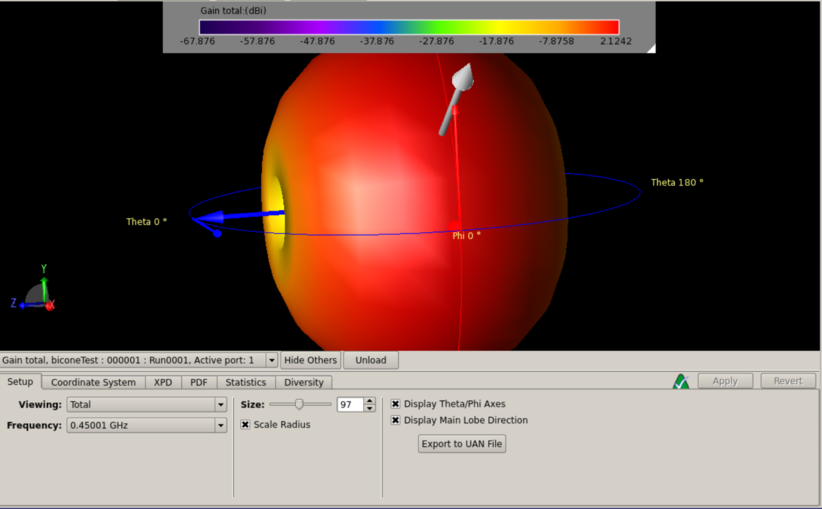
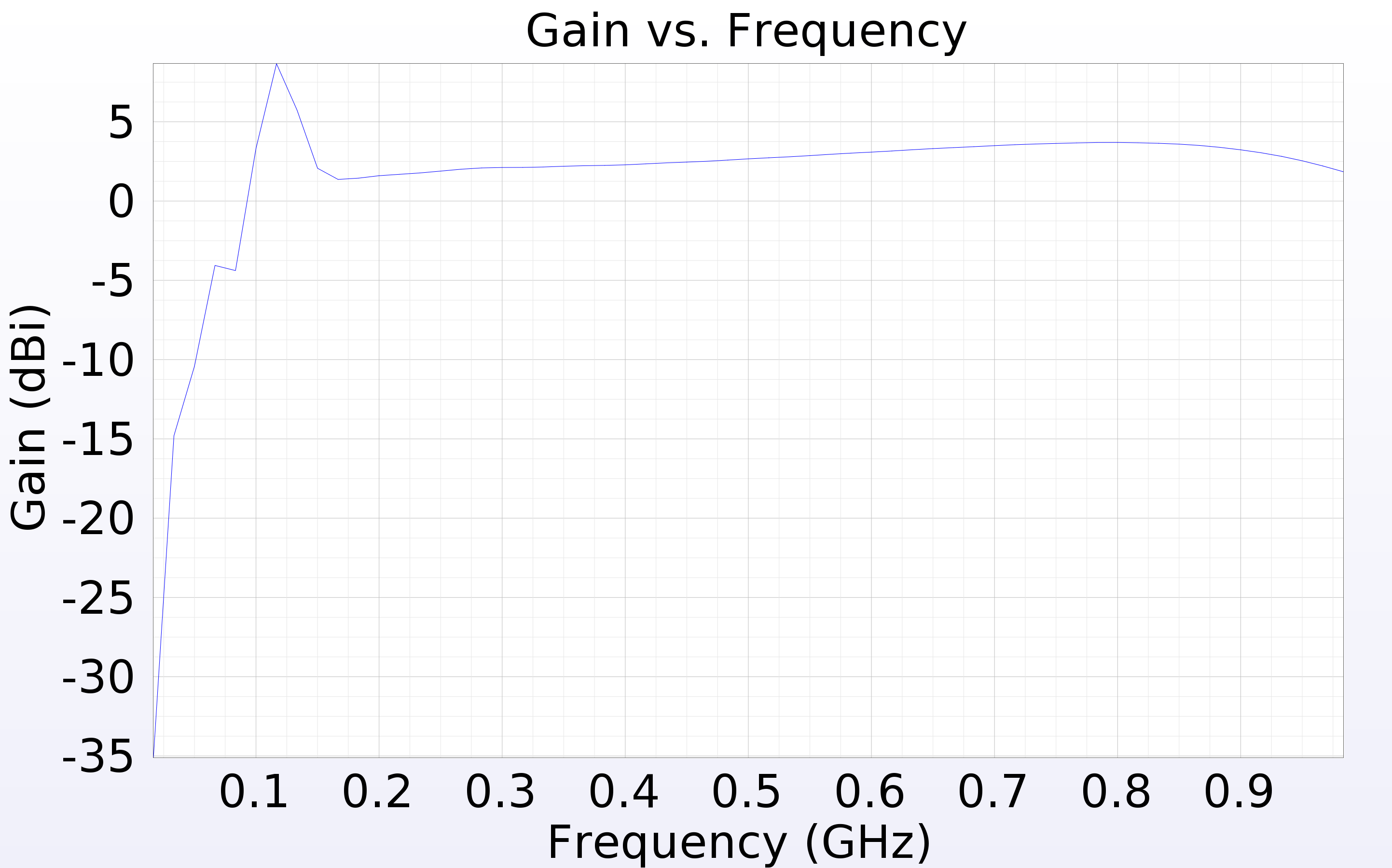
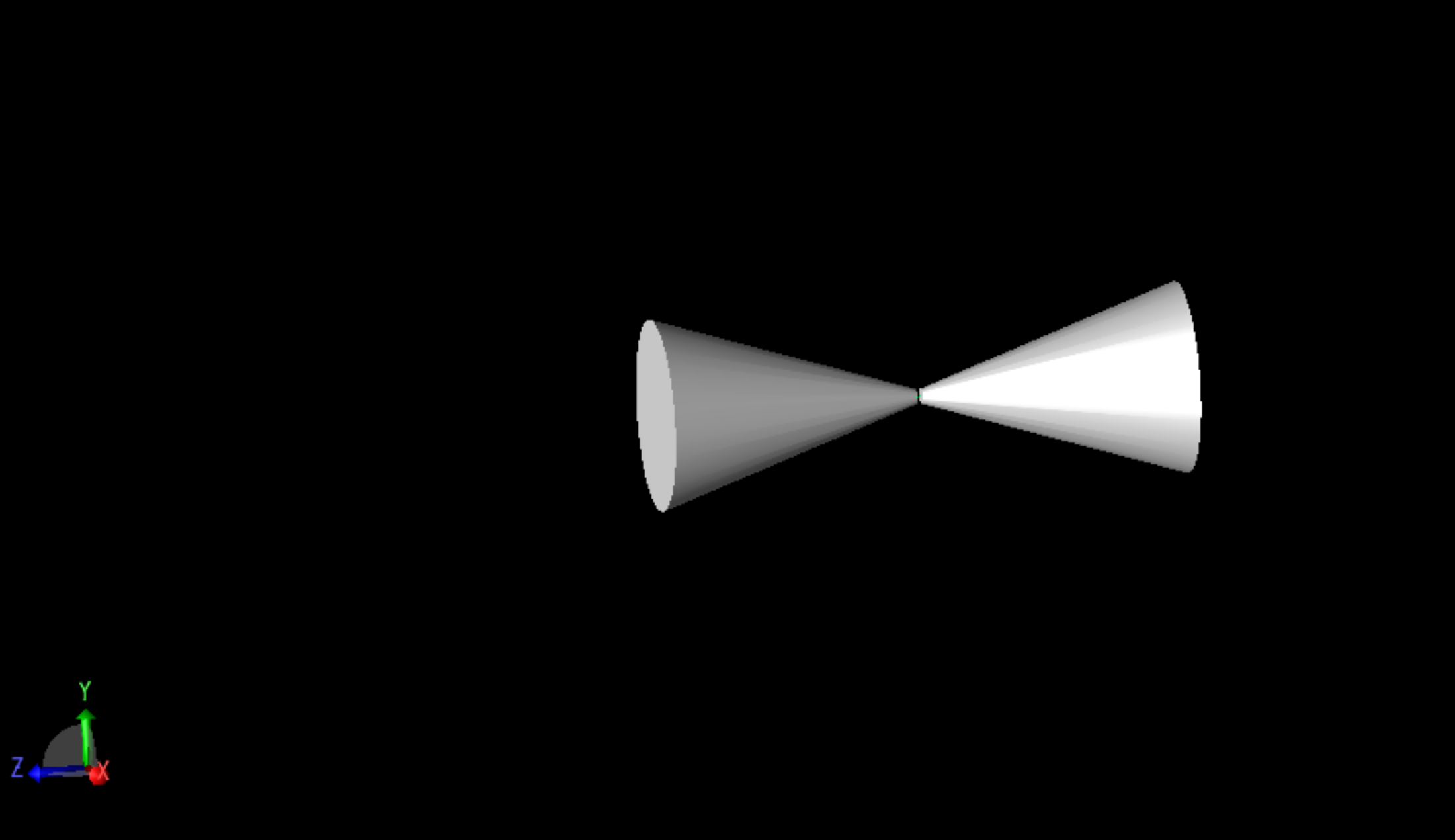
- The loop now works until AraSim. We are now getting the following AraSim errors:
- XF_Loop.sh: line 244: ./AraSim: No such file or directory
- XF_Loop.sh: line 244: ./AraSim: No such file or directory
- Julie is going to help Cade make sure that this directory is correct and that it has been compiled! More info to come.
- Test GA (Suren):
- I've been working on creating a gaussian fitness score with which I can test the performance of our genetic algorithm. The idea is as follows: We run the GA and get a generation of individuals. We provide their fitness score by simply taking the values {radius, length, angle} as the {x, y, z} coordinate in a 3D space. We can then use a 3D gaussian to output a value at that location, and use that number as our fitness score. The beauty of this method is that we can then plot the progress of our genetic algorithm each generation as a dot in this 3D space, and we can see it slowly snake to the center. Additionally, we can use more complex fitness scores, like one with a local maxima and a global maxima to see if it get's stuck in the local maxima. Below, I have an image I generated on python of a 2D section contour plot of a 3D gaussian in length-angle space. The dark purple is a lower value and the yellow is a higher value of the gaussian. The lines and dots hand-drawn on top are an idea of what it would look for like to start the GA at the red dot and see it's progress each generation until it reaches the center, shown by the white dots. Running this for our current roulette algorithm would make a very nice GA proof of concept plot for the paper, I believe!
.png.png)
- Gain pattern plots -- Make them 3D (Evelyn) & put on GitHub
- We need to figure out how to make a group Github. We have a lot of Githubs made by people and we need them all accessible from a group account. Right now the old dipole Github and the CalPoly stuff are linked to a group account. We need to find out how to get the Bicone account held by Max, and Evelyn's plotting code all on the group account: https://github.com/gp-antennas.
- Update: Evelyn and Max have contacted Brian to get their accounts linked. It looks like Amy, Brian, and Stephanie (Cal Poly) are the owners.
- Insert LR plot & Gain plot to loop (?)
- Edit bash script
- Update Github
- AraSim plots (Julie and Max) -- see #2 and #3 here: http://radiorm.physics.ohio-state.edu/elog/GENETIS/7 for details.
- Max and Julie have gotten sample data on Owens.
- located at /users/PCON0003/cond0068/ARA/AraSim/branches/AraSimLite/outputs
- Max and Julie have gotten sample programs from Jorge.
- https://github.com/toej93/AraSim_noise_calib/blob/master/readTree.cc
- https://github.com/toej93/AraSim_noise_calib/blob/master/M.readTree
- Julie installed root, and had Max source Julie's thisroot.sh files to run root on Owens.
- Max installed Arasim to his user.
- Next step: run plotting software given by Jorge.
- Update manual with things from Suren's last post here: http://radiorm.physics.ohio-state.edu/elog/GENETIS/8
|
|
Wed Feb 27 16:29:35 2019, Julie Rolla, New To-Do List
|
Here are the following things we need to work on:
- Paper (Julie and Suren)
- Get loop working-- specifically XF (Cade)
- Test GA (Suren)
- Gain pattern plots -- Make them 3D (Evelyn) & put on GitHub
- Insert LR plot & Gain plot to loop (?)
- Edit bash script
- Update Github
- AraSim plots (Julie and Max) -- see #2 and #3 here: http://radiorm.physics.ohio-state.edu/elog/GENETIS/7 for details.
- Update manual with things from Suren's last post (?)
|
|
Fri Feb 22 17:09:28 2019, Suren Gourapura, Updates that need to be added to the manual
|
We are redesigning the way we simulate antennas in our loop. To do this, we changed our simulationPEC macro skeletons and our output skeleton.
To make this easier, we changed the way we name the files, from i.uan where i is the simulation number, to i_j.uan where i is the antenna and j is the frequency.
We also rewrote XFintoARA.py so it's clean. Note that before there were comments from a previous author claiming it was VERY questionably written. This has now been cleaned up. We also changed the bash script relevant to the above changes.
This change needs to be added to the manual, and until we update this update, we have not done it.
|
|
Fri Feb 22 15:46:33 2019, Julie Rolla, Updated To-Do List
|
We are getting to the stage where we would like to verify each step. It has been requested by Amy that we verify them visually. Here are the plots we need to make.
- Add plotting for L & R parameters (note that we already have similar software to this from the dipole check. You can find this in the GitHub from the dipole test here: https://github.com/hchasan/XF-Scripts). This should be between A, and B in the loop drawing on the manual. (Done)
- Plot the distribution of theta and phi of incoming signal. This should be after D in the loop drawing on the manual.
- Plot the distribution in cartesian coordinates of the neutrino interaction position. Maybe we can also plot the distance between the interaction point and the antenna. This should be after D in the loop drawing on the manual.
Finally, as a tasks not to do with plotting, we need to make sure we don't lose any data as we go. We want to make sure that we keep tagged or labelled which individuals survive, and save the data flagged for those as we go. |
|
Fri Feb 22 15:43:36 2019, Julie Rolla, Proposal requests for XF (Remcom)
|
Here are a list of things we wish XF would do. We are keeping this list in hopes to add it to a proposal with them.
- Save pictures of CAD drawings of simulations.
- Close/quit XF GUI. App.quit doesn't actually work for us.
- Suppress the GUI and run solely through terminal.
|
|
Thu Feb 21 14:07:14 2019, Julie Rolla, Logging into Nutau via XRDP
|
As mentioned in the manual, using ssh to login to Nutau causes delays; the XFdtd GUI cannot be surpress and must be forwarded via X11 forwarding, and this is extremely slow. We are currently looking into using a newly suggested option, XRDP. Information will be added as this process continues. |
|
Wed Feb 6 17:36:24 2019, Julie Rolla, GENETIS update 2/6
|
Atttendance: Julie, Max, Cade, Suren, Evelyn, Sophie
Today's tasks:
Max works on AraSim section (needs to do more research and reading)
Julie, Suren, Sophie, Evelyn work on plotting software to plot gain patterns of indiviudals
Cade preps impuse XF code to be implemented
To-Do list:
I. Divide up sections on paper, and work on them. See http://radiorm.physics.ohio-state.edu/elog/GENETIS/1 for section assignments.
II. Implement impuse code.
- This will require us to change XFintoARA.py so that it takes less output files.
- Is there anything else different with the output files?
III. Finish Evelyn and Sophie's plotting software.
- This means also puting it onto Nutau, and adding in lines to the bash script (both to move and save the images, and to run the code!)
Here are things we can do if we are waiting for Remcom:
I. Change sides of bicone to be sinusoid instead of lines.
II. Take known bicone parameters and put it through AraSim to check if it's working properly.
- This also means we should make plots with it to triple check.
III. Test GA and make it maximize other paramaters to see how it does. |
|
Wed Feb 6 17:30:51 2019, Julie Rolla, Our Github, Dropbox, & Slack links
|
Slack: https://gpantennas.slack.com/messages
elog:http://radiorm.physics.ohio-state.edu/elog/GENETIS/
Github link: https://github.com/mclowdus/BiconeEvolution
DropBox link: https://www.dropbox.com/home/GP_Antennas
Old GitHub for the evolution of the dipole: https://github.com/hchasan/XF_Scripts |
|
Wed Feb 6 17:28:29 2019, Julie Rolla, Bicone User Manual (w/ links to Dipole work)
|
Hi all,
The working copy of the user manual can be found here: https://www.overleaf.com/6955763886pjtkckprxsyp
It still need to be tested by someone new to see if edits need to be made. I have uploaded the copy that is finalized as of this day. Note if you click on the overleaf version that may be more up-to-date. This copy is added as a PDF so we can keep track of versions. |
|
Wed Feb 6 17:23:18 2019, Julie Rolla, GENETIS Paper working draft
|
The current working draft of the GENETIS paper can be seen here: https://www.overleaf.com/6783528497tvqbjphsgvzn
Additionally, here's our outline for the paper. The section assignments are as follows:
I. Intro (Julie)
II. Types of Algorithms (Suren)
III. XFdtd (Cade)
IV. AraSim -- will be called something else... (Max)
V. Fitness function (Suren)
VI. Results (Julie)
VII. Conclusion (We will see..)
Note that the order of the sections may change. |
|