| |
ID |
Date |
Author |
Subject |
|
|
226
|
Sun Jun 18 21:32:03 2023 |
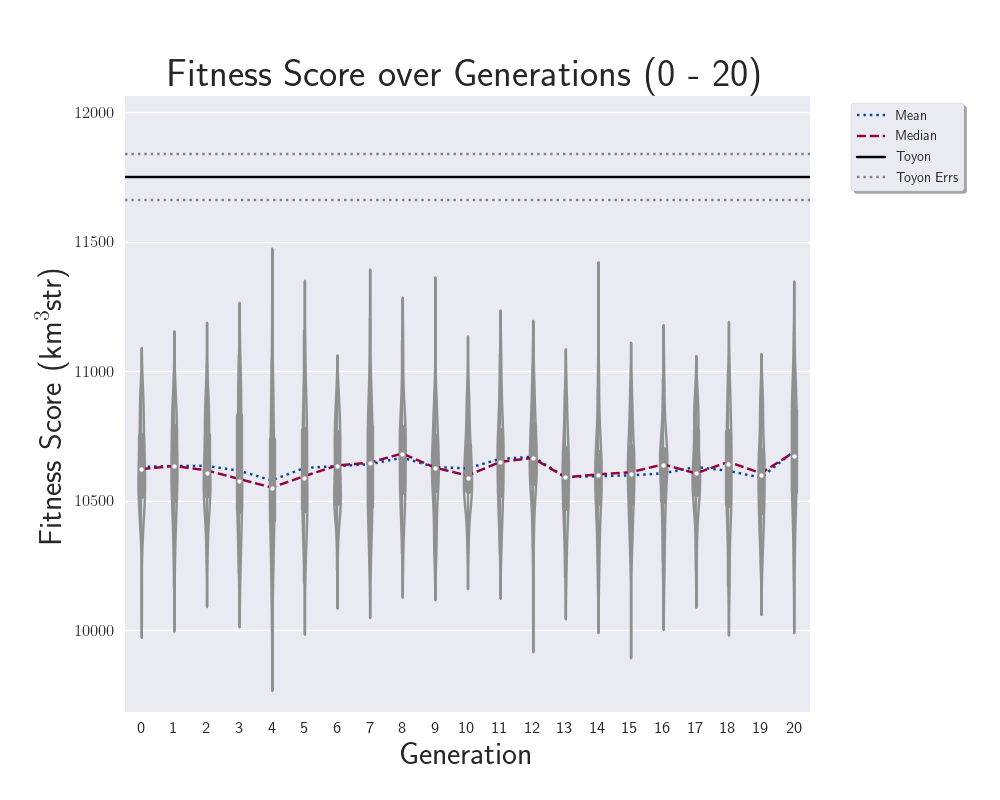
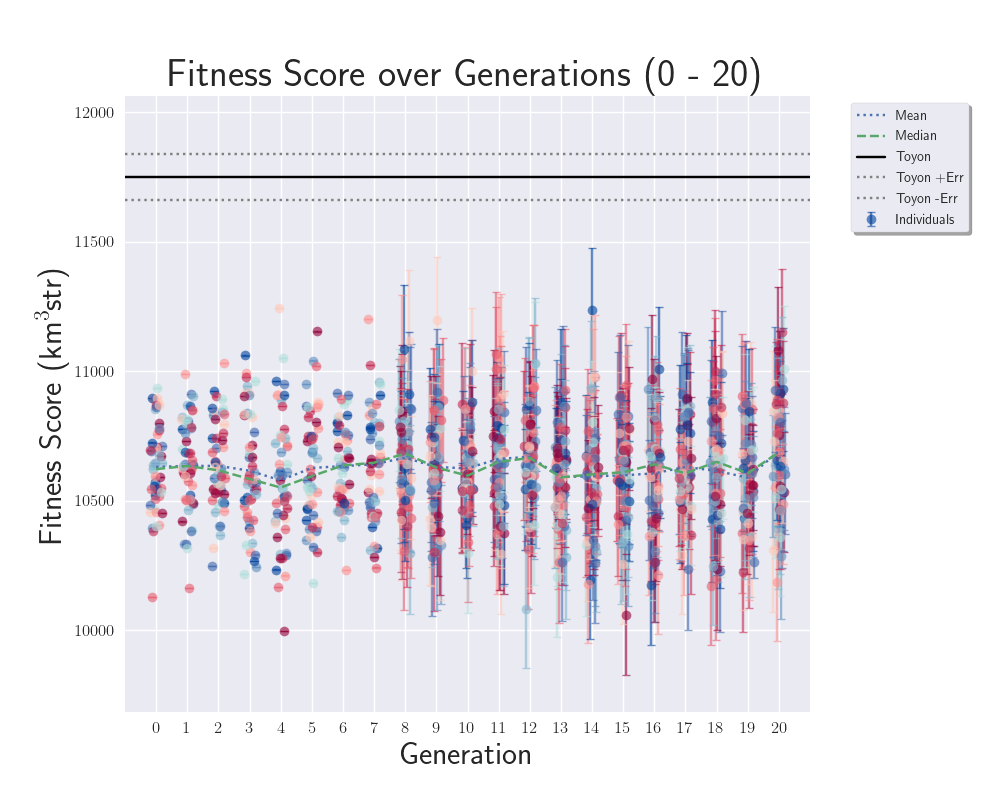
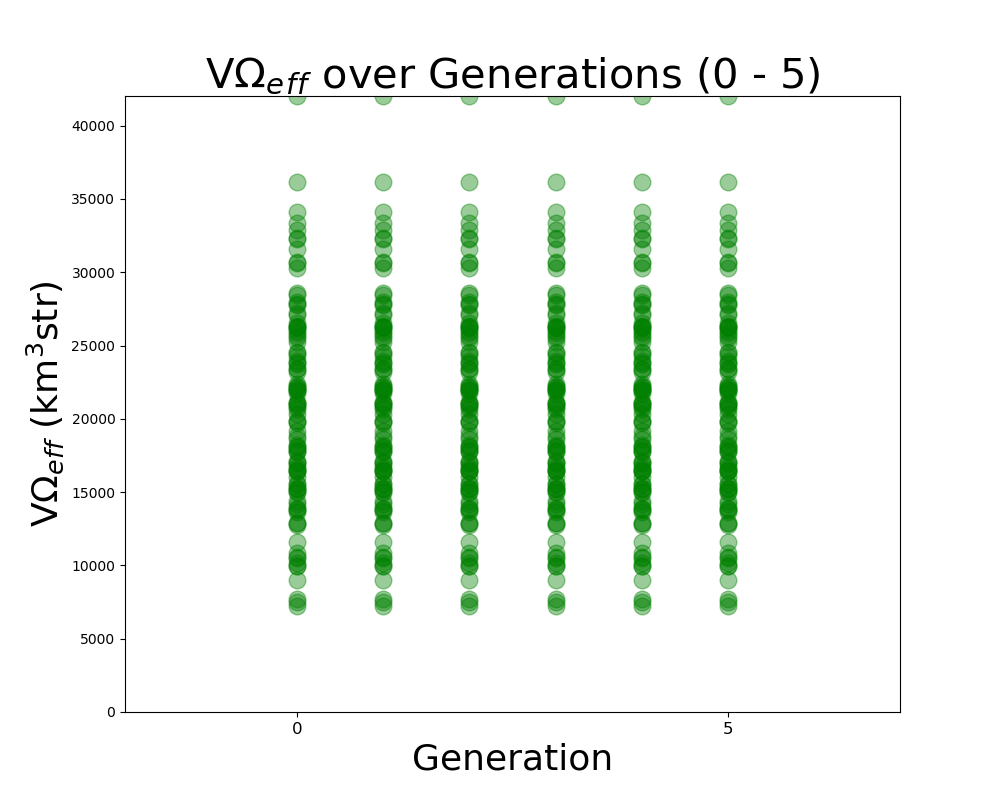
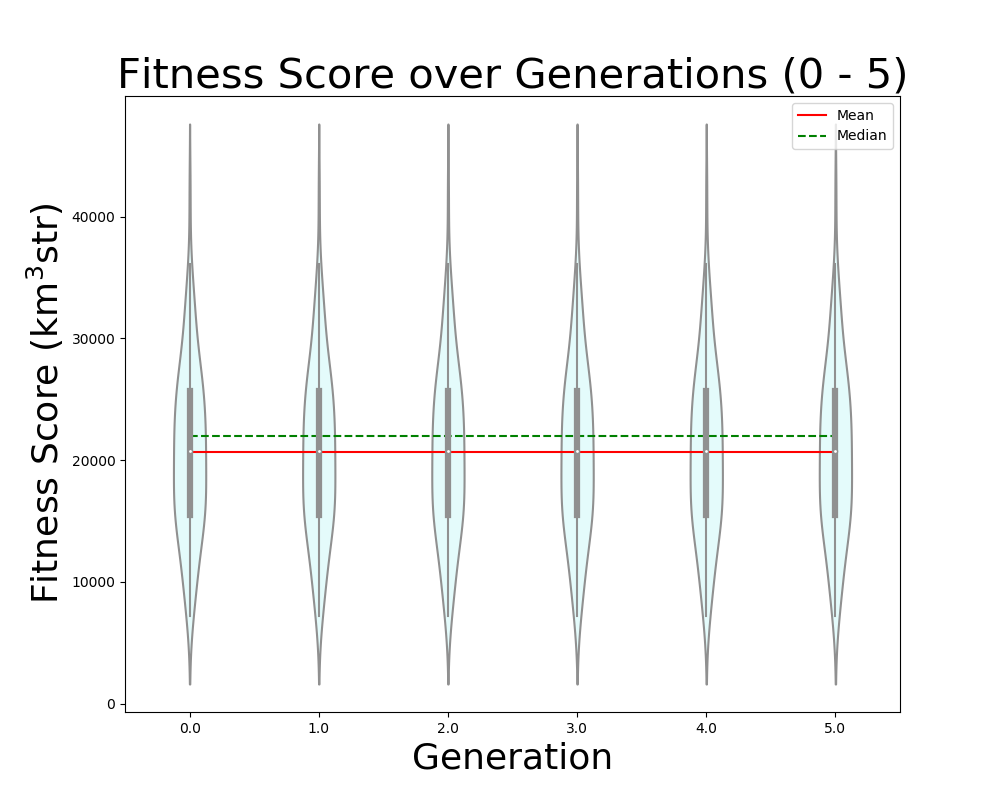
Dylan Wells | Default Toyon Antenna Simulation | To act as our comparison to the evolved antennas while plotting, we have done a simulation of pueoSim with 4,000,000 neutrinos for the measured toyon gains found in /fs/ess/PAS1960/buildingPueoSim/pueoBuilder/components/pueoSim/data/antennas/measured
In order to run the jobs, I used the runJobs.sh script found in /fs/ess/PAS1960/buildingPueoSim which submits job runs of 40,000 neutrinos at a time, mirroring what we do in the actual loop.
The resulting data is now located in /fs/ess/PAS1960/HornEvolutionOSC/GENETIS_PUEO/BiconeEvolution/current_antenna_evo_build/XF_Loop/Evolutionary_Loop/Toyon_Outputs
Veff: 11750.0503856
Plus Error: 89.0051458227
Minus Error:88.9007824246
The fitness score plots have been updated to read this value in as a comparison.
|
| Attachment 1: 248599981-8eacbc83-d42e-4da4-9746-bda05b2b4a38.png
|  |
| Attachment 2: 248599974-bee7a4db-34c6-4cfd-bde0-3682ff3ebaf7.png
|  |
|
|
225
|
Wed Jun 14 14:38:22 2023 |
Alex M | PUEO Antenna Dimensions | Here are my recommended starting genes for the initial generation of the upcoming run (confirmed that these will produce a working antenna in XF). We want to use the lowest values we can because we expect that a larger (namely, taller) antenna will perform better:
S, H, x0, y0, yf, zf, beta
7.50000,50.0000,1.0000,1.00000,1.00000,50.0000,0.2
- S: Half the side length of the bottom of the antenna
- H: height of the antenna
- x0: distance of the bottom of the ridge from origin
- y0: width of ridge at the bottom
- yf: width of ridge at top
- zf: final height of the ridge (cannot exceed H)
- beta: a curvature parameter for the ridges
|
|
|
224
|
Mon Jun 5 15:00:07 2023 |
Ryan Debolt | Github tests | We want to automate tests in pull requests in GitHub to run unit tests on individual functions to ensure they return the expected results. This will help prevent bugged code from being pushed to working branches. We will add a list of unit tests to this ELOG as we design them.
|
|
|
223
|
Fri Jun 2 00:21:36 2023 |
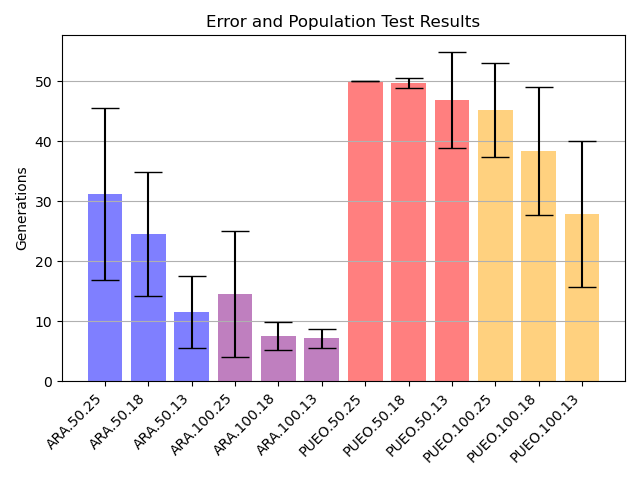
Ryan Debolt | Error test results | Attached is a plot containing bar graphs with error bars representing the average number of generations it took for the GA to achieve a chi-squared value of 0.25 (roughly equated to a 0.8 out of a max 1.0 fitness score). Unlike the fitness scores used by the GA, these values do not have simulated error attached to them and are therefore a better measure of how well the GA is optimizing. These results were obtained by running 10 tests in the test loop for each design, population, and error combination and solving for the average number of generations to meet our threshold and the standard deviation of those scores. From this, a few things immediately pop out, I will address the more obvious one later. But essential for this test, we can see that increasing our population size seems to have a more direct impact on the number of generations needed to reach our threshold than decreased error does in both designs. My best guess regarding this is that the GA depends on diversity in its population in order to produce efficient growth, and an increase in the number of individuals contributes to this, allowing the GA to explore more options.
This leads me to the more easily spotted trend; PUEO is much slower than ARA. This presents an anomaly as this is the opposite of what we would expect from this test loop as PUEO has fewer genes (7) to optimize than ARA (8). It is also important to note that no genes are being held constant in this test for either design, so both designs have the full range of designs provided they are within the constraints. With that in mind, my guess as to what causes this phenomenon is that PUEO's constraints are much stronger than ARA's. How this may affect the growth is that it more heavily bounds the possible solutions, which makes it harder for the GA to iterate on designs. It is possible that during a function like a crossover, the only possible combinations for a pair of children are identical to their parents, effectively performing reproduction. This could limit the genetic diversity in a population and therefore cause an increase of generations needed to reach an answer. We could in theory test this by relaxing the constraints done by PUEO and then running the test again to see how it compares.
Finally, You will notice that no AREA designs are shown. This is because, under current conditions, they never reached the threshold within 50 generations. However, Bryan and I think we know what is happening there. AREA has 28 genes, about four times the amount of genes that our other designs use. Given that our current test loop fitness measure is dependent on a chi-squared value given by: SUM | ((observed(gene) - expected(gene))^2) / expected(gene) |, we can see that given more genes, the harder it gets to approach zero. For example, we can imagine in an ARA design if each index of the sum equals 0.1, you would get a total value of 0.8, while AREA would get a value of 2.8, which seems considerably worse, despite each index being the same. Upon further thinking about it, Bryan and I do not think that a chi-squared is the best measure of fit we could be using in this context. Another thing we thought about is that we have negative expected values in some cases. We have skirted around this by using absolute values, but upon reflection believe this to be an indicator of a poor choice in metric. Chi-Squared calculations seem to be a better fit for positive, independent, and normally distributed values, rather than our discrete values provided by our GA. With this in mind, we propose changing to a Normalized Euclidean Distance metric to calculate our fitness scores moving forward. This is given by the calculation: d = sqrt((1/max_genes) * SUM (observed(gene) - expected(gene))^2). This accomplishes a few things. First, it keeps the same 0 -> infinity bounds that our current measure has, allowing our 1/(1+d) fitness score to be bounded between 0 and 1. Second, it forces all indices to be positive so we don't need to worry about negative values in the calculation. Third, this function is weighted by the number of genes present for any given design, making them easier to compare than our current measure. Finally, as our GA is technically performing a search in an N-dimensional space for a location that provides a maximized fitness score, it makes sense to provide it the distance a solution is from that location as a measure of fit in our test loop. We created a branch on the test loop repository to test this and the results are promising as results from the three designs are much more comparable for the most part (though we still see some slowdown we think is contributed to constraints as mentioned above). Though some further input would be appreciated before we begin doing tests like the one we have done in the plot below. |
| Attachment 1: test_results(1).png
|  |
|
|
222
|
Thu Jun 1 21:49:29 2023 |
Dylan Wells | Guide to Updating pueoSim | How To Update PueoSim For GENETIS:
First, whoever updates pueoSim needs access to pueoBuilder, pueoSim, and niceMC on GitHub (ask Will for permissions).
Once you do, go into the peuoSim directory at /fs/ess/PAS1960/buildingPueoSim/
and source set_env.sh
`source set_env.sh`
Then, we want to make copies of the files we are currently modifying for the GENETIS loop.
For PueoSim v1.1.0 these are:
-
nicemc/src/EventGenerator.cc # Modified to create custom output root files to calculate errors
-
pueosim/test/simulatePueo.cc # Modified to stop the simulation of the LF antenna which is not needed for GENETIS
-
pueosim/src/Seavey.cc # Modified to read in custom gain files
-
pueosim/src/pueo.cc # Modified to read in custom gain files
-
pueosim/include/Seavey.hh # Modifies to read in custom gain files
Currently, I store copies of these in the `/fs/ess/PAS1960/buildingPueoSim/backups` directory in case somebody accidentally overwrites the files in pueoBuilder.
Once you’ve made the copies, you can run `./pueoBuilder.sh` from the `/fs/ess/PAS1960/buildingPueoSim/pueoBuiler` directory. This will rebuild pueoSim and niceMC, pulling the latest updates from GitHub.
You may need to delete the pueoSim and niceMC directories in order for the builder to pull the latest version from GitHub. Or, if it’s being really stubborn, move the whole pueoBuilder directory to a temporary location and run the builder from scratch with
`git clone git@github.com:PUEOCollaboration/pueoBuilder` and then `./pueoBuilder.sh`
Then, you will need to reference the copies of the changed files to make changes to the new version of pueoSim. Hope this doesn’t cause too much of a headache, and when you’re done, return to the /fs/ess/PAS1960/buildingPueoSim/pueoBuiler directory.
Then you simply type
`make install`
then
`make`
And now, pueoSim should be ready to run!
EventGeneratior.cc Changes and Rationale:
PueoSim’s default output ROOT files are very large and therefore time-consuming to parse through to get the information we need to calculate effective volume and errors. So, we want to create a custom ROOT file with only the variables we want, greatly increasing the speed of the analysis.
To do this, we want to create a new TFile with corresponding TTree and TBranches that will store the loop.positionWeight, loop.directionWeight, and neutrino.path.weight. Then, we want to fill the Tree when a detector is triggered and write the results to the file at the end of the loop.
Sample code for initializing the TFile:

simulatePueo.cc Changes and Rationale:
By default, pueoSim v1.1.0 runs a simulation for the normal antenna and a low-frequency (LF) antenna. As GENETIS is evolving for the main antenna, we are not interested in using computation time to simulate the LF antenna. So, we comment out the lines that initialize the LF detector in this file.
Seavey.cc, Seavey.hh, and pueo.cc Changes and Rationale:
As of pueoSim v1.1.0, the simulation software only has the ability to read in one antenna. This is a problem, as we want it to be able to read in files for any antenna we make. So, we need to change these scripts to be able to read in whatever gain files we want.
The convention the loop uses is to input gain files in the format of
vv_0_Toyon{runNum}
hh_0_Toyon{runNum}
…
In the ./pueoBuilder/components/pueosim/data/antennas/simulated directory
So, the main change is getting the runNum variable into Seavey.cc file where the gains are read. Currently, we define a global variable at the stary of pueo.cc and pass it into where Seavey is called. This means we have to add runNum as a parameter in Seavey.cc as well as Seavey.hh. Finally, we change the name of the read-in files to be in the above format AFTER dividing runNum by 1000 (this is because pueoSim uses the run number as a random number generating seed, so we divide runNum by 1000 to be able to read in the same gain patterns for multiple seeds of the same individual).
Note: We used to change pueoSim to output a veff.csv file. We now handle this calculation by analyzing ROOT files, so this change is no longer necessary. |
|
|
Draft
|
Mon May 29 20:21:07 2023 |
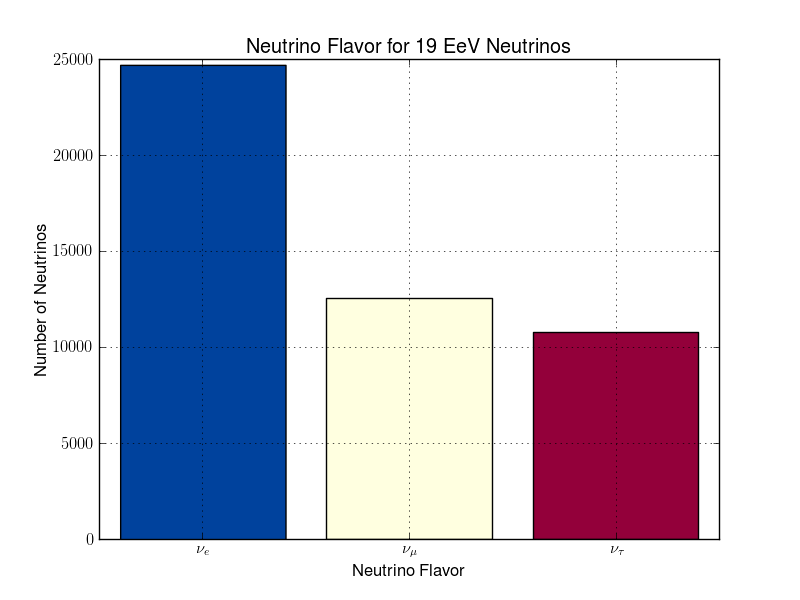
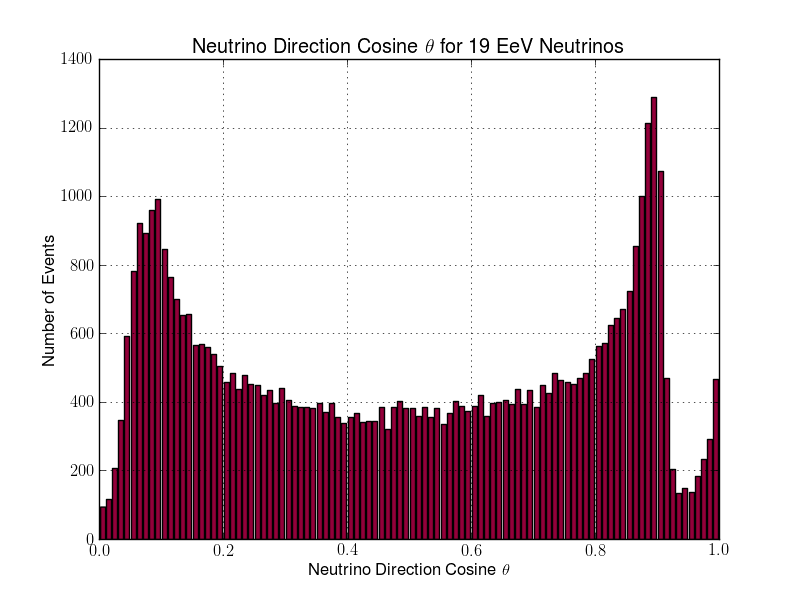
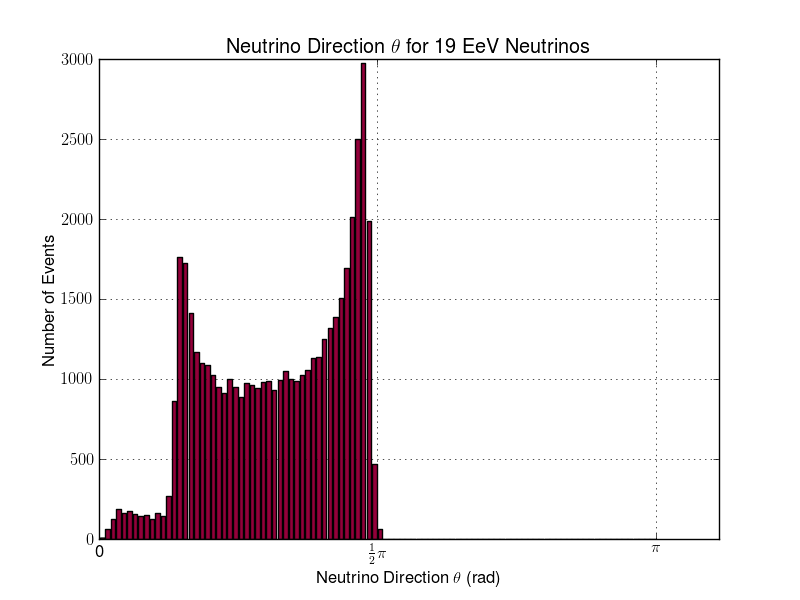
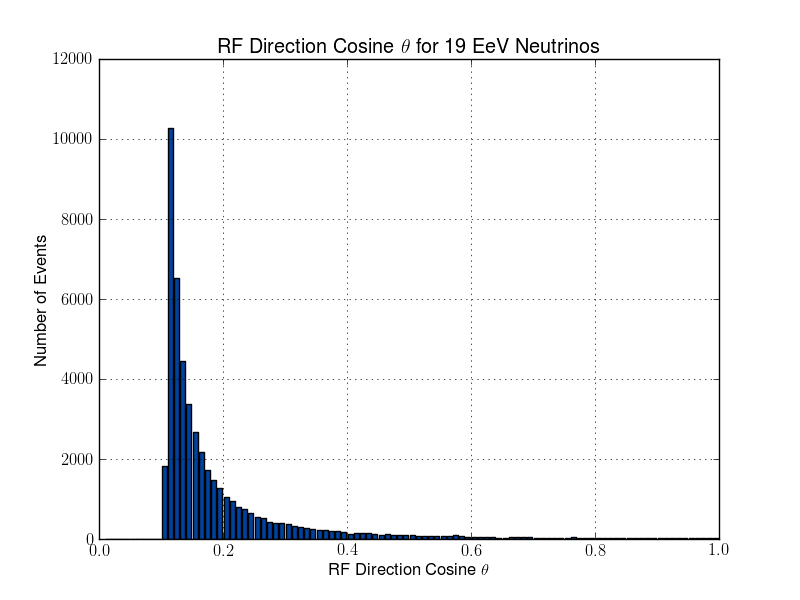
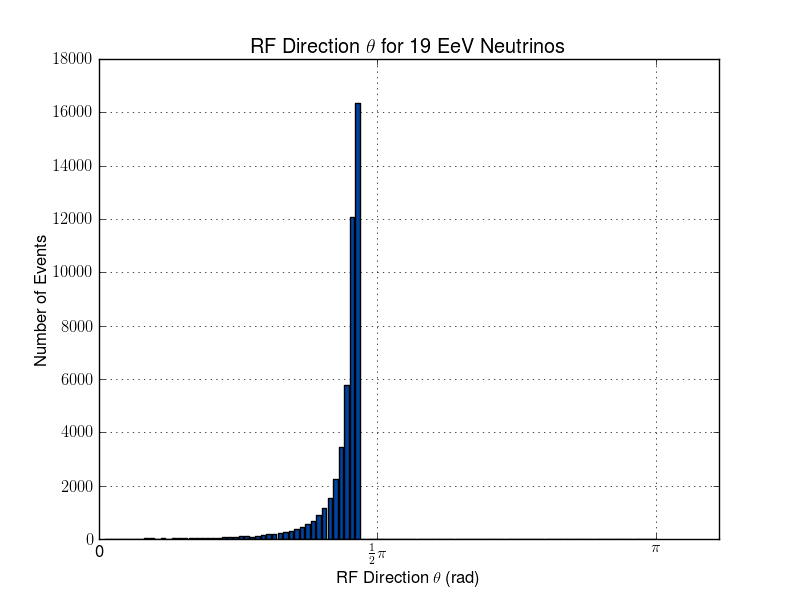
Dylan Wells | Pueo Physics of Results Plots | The Physics of Results Plots have been added to the Pueo Loop. The current version of the plotter is built for pueoSim v1.0 and located in ${WorkingDir}/Antenna_Performance_Metric (Hasn't been pulled into the loop directory yet).
The pueoSim v1.0 IceFinal files were missing information on the RF direction and information needed to see an amplitude spectrum. I asked Will, and he said that the new version of pueoSim (v1.1.0) outputs the needed information.
I created an updated version of the plotter, and have a pull request here: https://github.com/osu-particle-astrophysics/GENETIS_PUEO/pull/40
However, before this can be implemented in the loop, we need a way to get errors from pueoSim v1.1.0.
Currently, there is a version of rootAnalysis.py here that can analyze the new root files and output fitness scores and errors, but instead of taking 20 minutes for a generation, it now takes 20 minutes per individual to run.
This is because the update splits the IceFinal file into IceFinal_allTree, IceFinal_passTree0, and IceFinal_passTree1. IceFinal_allTree and IceFinal_passTree1 are of comparable size to the previous IceFinal file, but the passTree0 final is
about 10-20 times larger, causing a slowdown in calculations. If we calculate without this file, it takes about 1 minute per individual, still a bit slower than before.
Ideas to solve this issue:
Don't use the passTree0 files (I have asked Will what they're for, and if we need them. Hopefully he responds after the Holiday.)
Instead of running through a Python for loop, call a C++ script that creates a CSV file the Python program can easily load in.
Submit a batch job to run the analysis in parallel before combining the outputs in the correct format. (We should maybe do this anyways?)
Continue using pueoSim v1.0 (I think we can still retain the Theta graphs for the incoming neutrinos, but there won't be any RF graphs or the possibility of amplitude spectrum plots)
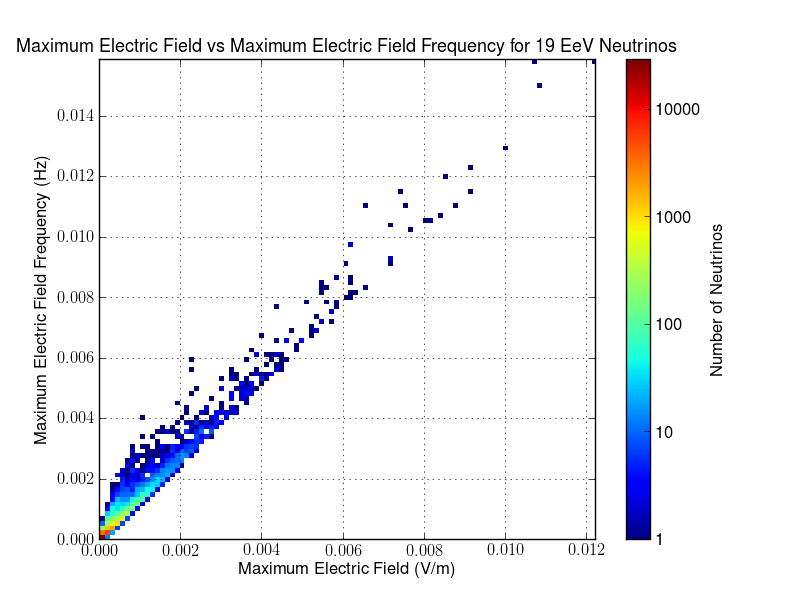
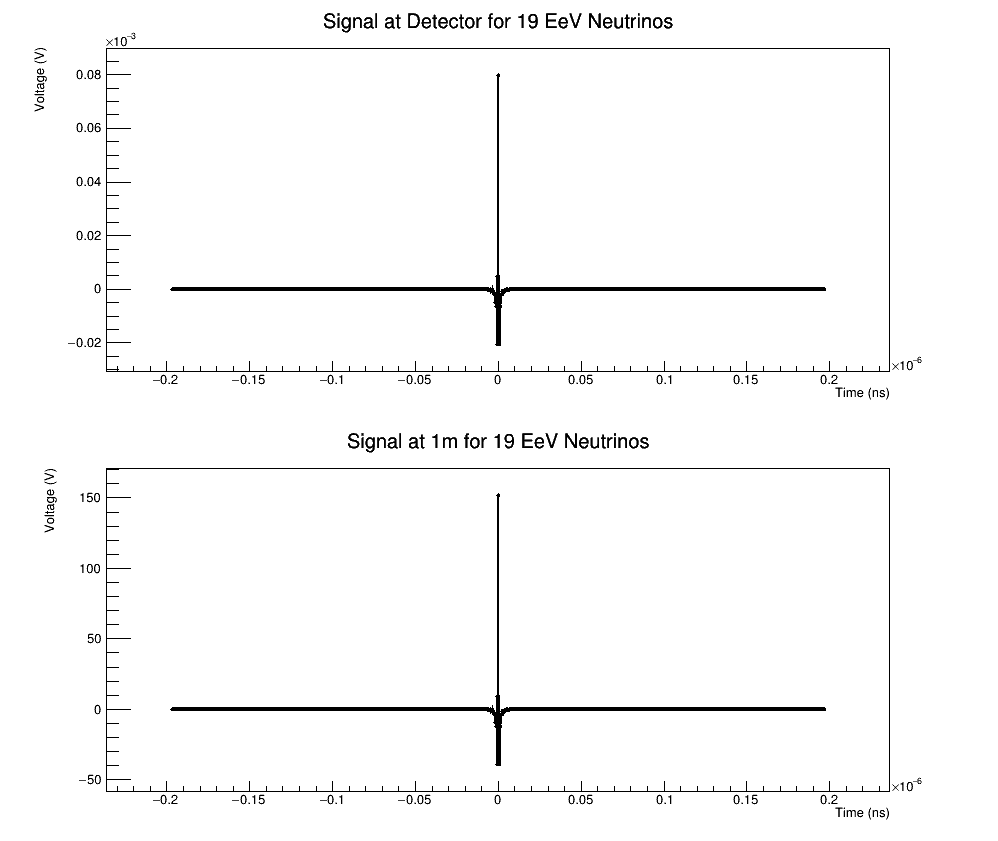
Attached is a preview of plots the v1.1 plotter is capable of making.
Add weights.
|
| Attachment 1: 1_neutrinoFlavor_bestindiv.png
|  |
| Attachment 2: 1_nuDirCosTheta_bestindiv.png
|  |
| Attachment 3: 1_nuDirTheta_bestindiv.png
|  |
| Attachment 4: 1_RFdirCosTheta_bestindiv.png
|  |
| Attachment 5: 1_RFdirTheta_bestindiv.png
|  |
| Attachment 6: 1_maxEField_vs_maxEFieldFreq_2d_bestindiv.png
|  |
| Attachment 7: 1_1_signals_bestindiv.png
|  |
|
|
220
|
Thu May 25 15:36:54 2023 |
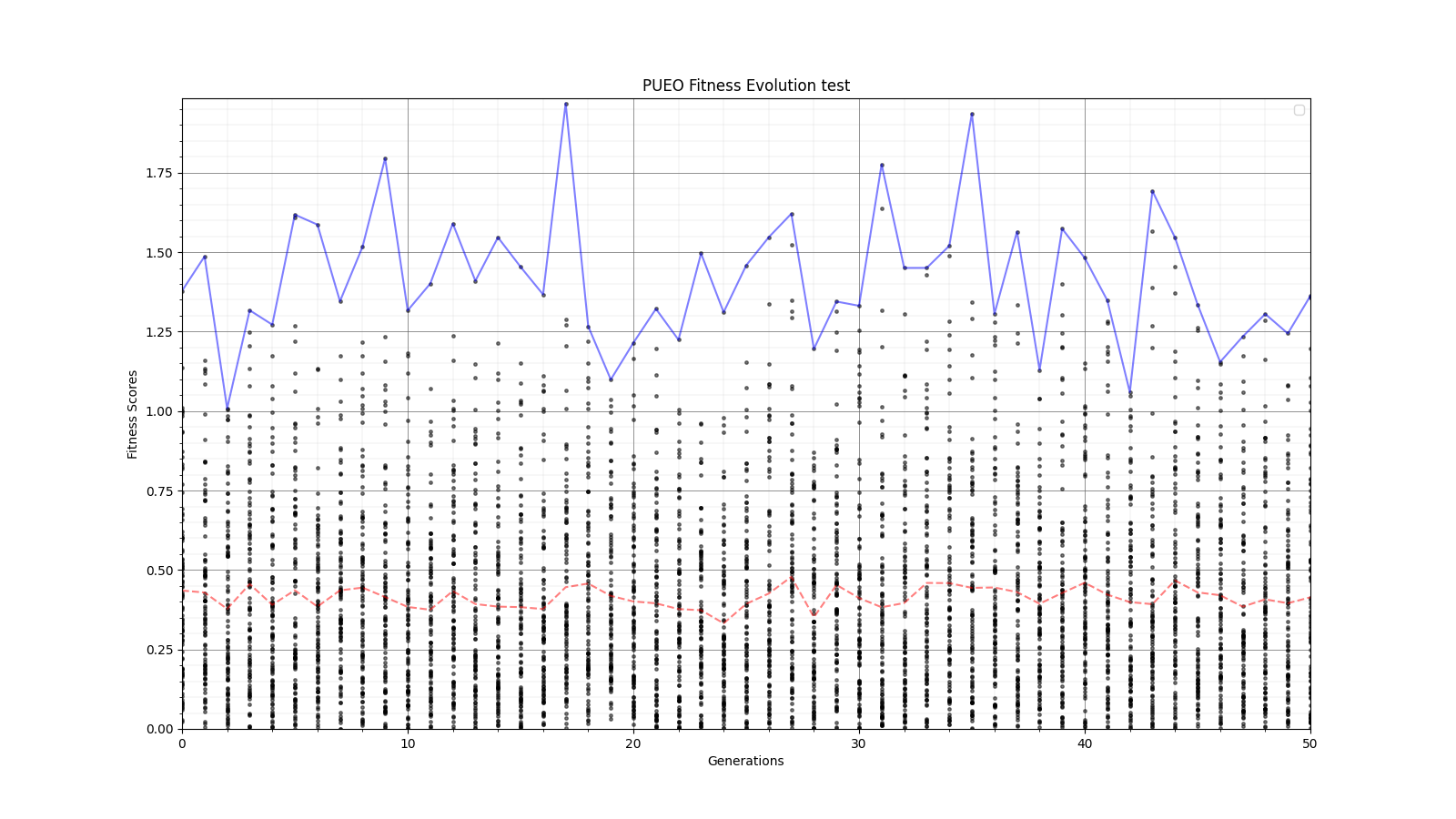
Ryan Debolt, Byran Reynolds | preliminary error tests (PUEO) | Here are some preliminary results from testing the effect of error on growth in the GA. For this test, we start with a simulated error of 0.5 because our true fitness score is bounded between 0.0 and 1.0. From here, we simulate doubling the number of neutrinos by reducing the error by root(2), then root(4), and observed the growth on the fitness scores plots. We did these three tests with both 50 and 100 individuals (plots starting with 30 use 50 and starting with 60 use 100). Looking at the plots, we can see that the only plot that shows growth is 100 individuals with halved error (corresponding to 4 times the number of neutrinos). In fact, it took going to root(25) (corresponding to 25 times the number of neutrinos) to observe comparable growth with 50 individuals. This leads us to believe we likely need to increase both neutrinos and individuals to see meaningful growth in our GA. Further tests are required to see how consistent these results are. Another test, though unrealistic, we ran 1000 individuals with the root(25), this test was optimized in around 10 generations, this could be seen as a maximum performance standard. |
| Attachment 1: 30_10_10_0_48_25_6_2_half_error_fitness.png
|  |
| Attachment 2: 30_10_10_0_48_25_6_2_high_error_fitness.png
|  |
| Attachment 3: 30_10_10_0_48_25_6_2_root2_error_fitness.png
|  |
| Attachment 4: 30_10_10_0_48_25_6_2_root8_error_fitness.png
|  |
| Attachment 5: 30_10_10_0_48_25_6_2_root25_error_fitness.png
|  |
| Attachment 6: 60_20_20_0_96_25_6_1_half_error_fitness.png
|  |
| Attachment 7: 60_20_20_0_96_25_6_1_high_error_fitness.png
|  |
| Attachment 8: 60_20_20_0_96_25_6_1_root2_error_fitness.png
|  |
|
|
219
|
Mon May 22 20:34:59 2023 |
Amy | Things to do before starting new PUEO run from 5/22/23 meeting | Here is a list of things we agreed to do before starting a new PUEO run. Feel free to add notes here as things are done and we will revisit the list next week.
Change range of the height variable to 0.75-1.75m
Start with all bad individuals so that we can be sure and see growth - all at 0.75m?
Make sure we are using the ratios in the GA that we think we are
If we are using reproduction, are we combining results when individuals are resimulated to reduce errors? I made a program to accomplish this and created a pull request on the PUEO Github (Dylan)
Investigate whether there are obvious places to speed up PUEOSim
Consolidate the GA to one branch
Understand what is happening with cross-pol, make sure we're not gettting Veff=0 when using XF-generated cross-pol response
Edit: Have the xmacros use the realized gain instead of the idealized gain, which allows for the design to build in matching
|
|
|
218
|
Thu May 11 15:57:08 2023 |
Ryan Debolt, Byran Reynolds | AREA Updates | Here is some backlogged information as well as recent updates to our progress on AREA and its optimizations:
4/13/2023
We concluded our initial test of the AREA optimization loop. While analyzing our results, we noticed that most of our runs never reached our benchmarks for performance (chi-squared scores of .25 and .1) and that those that did contain abnormally high amounts of mutation. From previous runs using the GA for the GENETIS loop, we find that mutation and immigration (Note: AREA does not use immigration) usually play a smaller role in overall growth and are simply there to promote diversity. Crossover on the other hand is what handles the bulk of the growth done by the GA. Given our results ran counter to that, we decided to look further into the matter.
Upon looking at the fitness score files, we could see that mutation-created individuals did not perform well in the best run types, but the crossover ones did contain the bulk of good scores. This lines up with expectations. However, closer inspection revealed that these crossover-derived individuals had extremely similar fitness scores, which could indicate elitism in selection methods leading to a lack of diversity in solutions. We then looked at a run that used only crossover with one selection type (roulette), and found every individual to have identical (and poor) scores that were the same up to around the 4th decimal place. This is a strong case that the selection methods used are too elitist to grow a population properly.
We dove into the AREA GA to take a look at the functions doing the selection methods, and discovered several issues potentially causing excess elitism in the GA. It seems that the roulette selection does not behave the way we have used in our other GAs. There appears to be no weighting of individuals; rather, a threshold fitness score is collected and only individuals with a fitness score above the threshold are selected. This causes elitism, as only the most fit individuals are likely to pass this threshold. Tournament was found to be similarly troubled, with a bracket size of ⅓ of the population. This is again very elitist, as it is very large, making it very likely that only the best individuals will be selected. Before we try to further optimize the AREA GA, these selection methods should be addressed and fixed.
For roulette, we propose implementing a similar weighting scheme for individuals as is used in the PAEA GAs that gives preference to the most fit individuals, but still allows others to be selected to encourage diversity of solutions.
For crossover, we propose decreasing the bracket size. This would allow a more diverse range of individuals to be selected through “winning” smaller brackets that would have a lower probability of including top performing individuals.
4/20/23
We (Bryan and Ryan) met to work on improving the selection method functions in the AREA algorithm.
For roulette selection, we added weighting by fitness score, as is done in the other GENETIS GAs, in an effort to prevent it from disproportionately selecting the most fit individuals only to become parents. As a first test, we ran an abbreviated version of the test-loop code, printing the fitness scores of the parents selected by the roulette method. The fix appears to have passed this initial test, as the fitness scores showed more variety and in the case of roulette crossover two unique parents seemed to be selected.
For tournament selection, the only change necessary appeared to be decreasing the bracket size of the tournament(s), which in turn encourages other individuals besides the most fit to be selected as parents, therefore increasing diversity of solutions. We ran out of time to test this change fully, so we will pick up here in our next meeting.
Looking further ahead, we will plan to work on refactoring the AREA algorithm to use the same functions as the other GENETIS GAs wherever possible. In the meantime, this working version can still be used for feature development so that progress is not halted.
5/11/2023
Upon looking at the results of the recent optimizations, our best runs are still taking over 40 generations to reach an optimized score. Given the speed of AraSim, this is still too slow to be considered optimal. Comparing this test loop run to the ones run on by the broader GENETIS GA, our best runs for the AREA GA are worse than the worst runs from those optimizations. As such, we have decided to pause optimizing the AREA GA in favor of adding it to the broader GENETIS one. As of today, we have finished a rough version of the generating function necessary to create new individuals. We have also started progress on the constraining functions and scaling functions that will be necessary to generate the spherical harmonics used to find the gain and phase. Once these functions are complete, we should be able to transplant this GA back into our test loop for AREA and resume optimizations.
|
|
|
217
|
Wed May 10 17:43:20 2023 |
Alex M | How to run the loop | In this post, I'm going to give step by step instructions on everything you need to do to run the loop. See Julie's thesis for the most recent iteration of this manual. Also refer to entry 123 for a list of some errors we have encountered historically in the loop and how to resolve them, though some fixes may be outdated.
Running the loop
Getting started
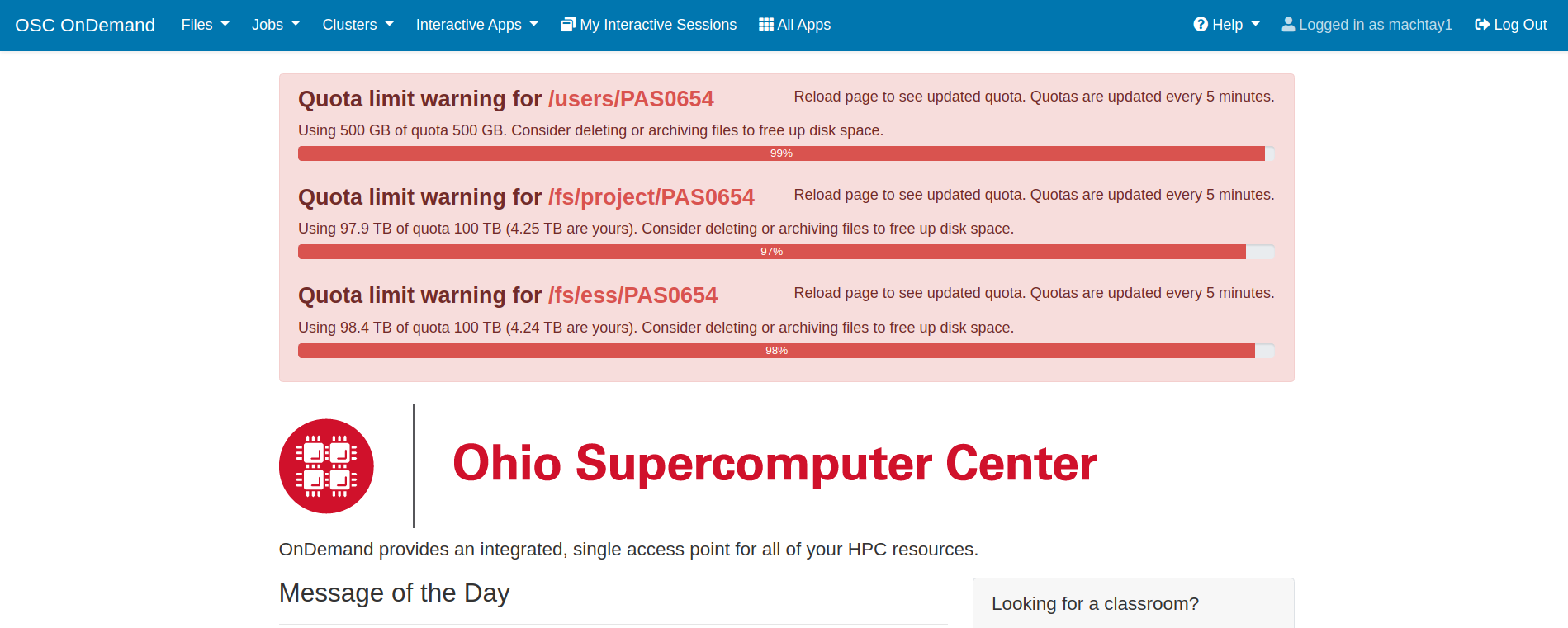
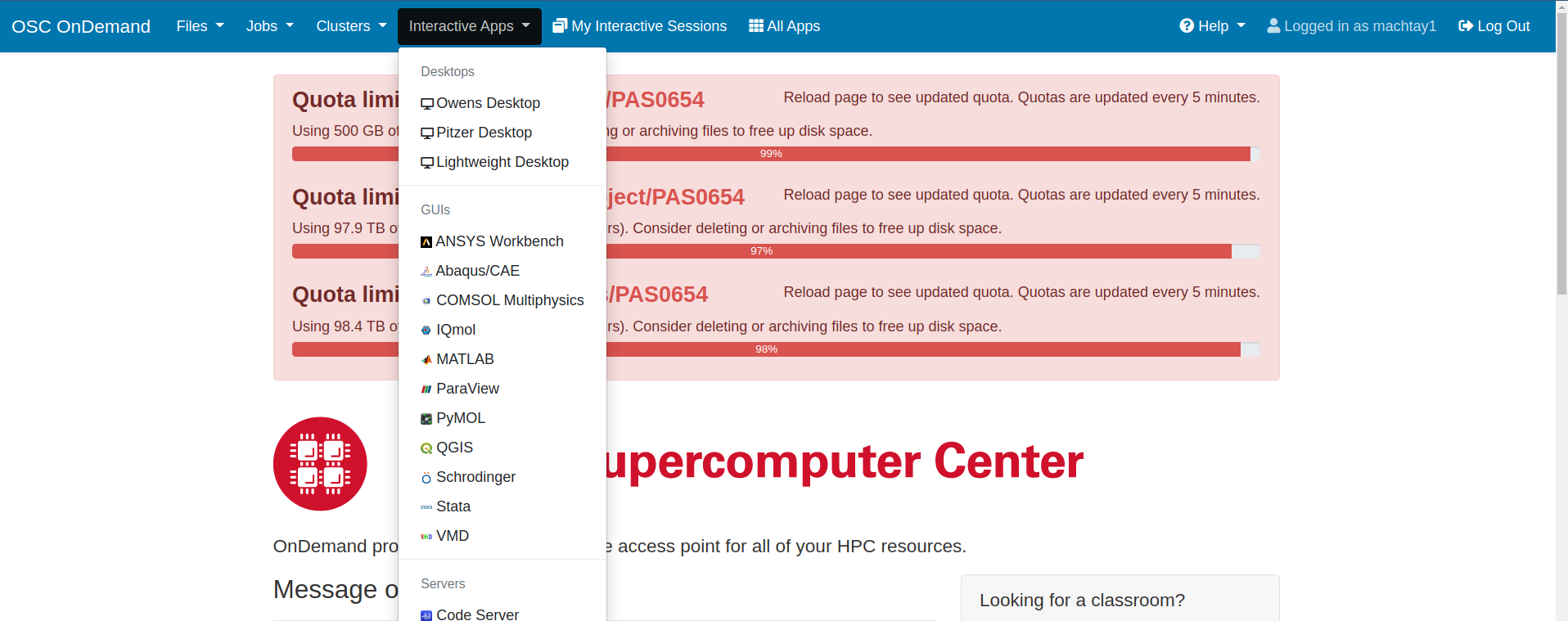
Assuming you have followed the instructions from the onboarding tutorials, you should be ready to access OSC through the interactive website. Instead of using ssh to access OSC, the loop requires that you go to this website: https://ondemand.osc.edu/ . Login with your usual OSC credentials. Once there, you will need to request a Lightweight Desktop by clicking on "Interactive Apps" at the top of the page. See the screenshots attached for how to do this. Old documentation may refer to the Lightweight Desktop as a VDI.
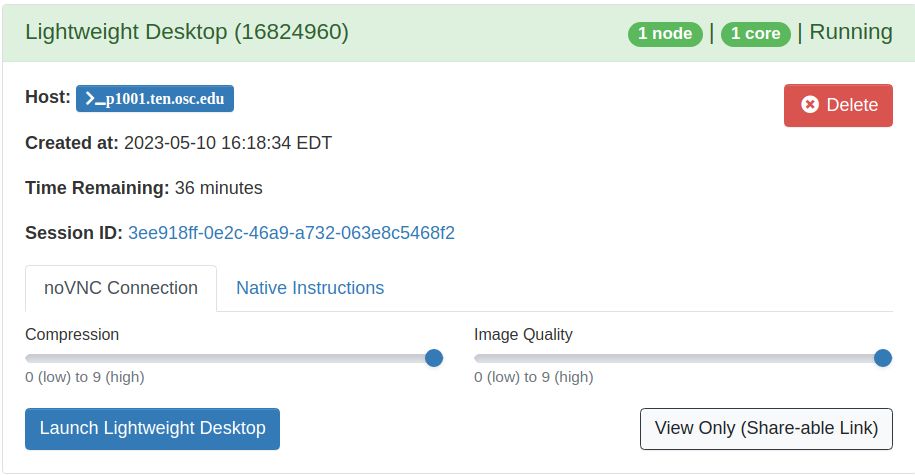
You can request up to 24 hours for a Lightweight Desktop, and it should begin almost immediately. After you request it, the website will take you directly to the waiting page. You can navigate to this page yourself by clicking "My Interactive Sessions" at the top of the ondemand page. When the job begins, you will see a blue buttong that says "Launch Lightweight Desktop". Click it and you should have a new tab open that brings you to a remote desktop environment on OSC that you interact with through your browser.
New runs
If you're starting a new run for the first time (that is, beginning from generation 0), you will need to edit the script that runs the loop. Here is the path: /fs/ess/PAS1960/HornEvolutionOSC/GENETIS_PUEO/BiconeEvolution/current_antenna_evo_build/XF_Loop/Evolutionary_Loop/Loop_Scripts/Asym_XF_Loop.sh . At the top of the script is a list of variables that can be changed. See the first screenshot attached here.
For a new run, you must change the variable <RunName>, which is the first variable in the list. It should be in quotes and the convention is to start the name off with the date of the run, using YYYY/MM/DD format--this will always keep everything in chronological order when listing directories with <ls>. Other variables are explained in the comments next to them in Asym_XF_Loop.sh and you should change them depending on the type of run you are conducting.
To begin the loop, type in the command ./Loop_Scripts/Asym_XF_Loop.sh from the Evolutionary_Loop directory.
When the loop begins, you will be asked to press any key. After you hit a key, the loop will run Part A, which executes the GA using the <start> mode. It will then automatically move on to Part B, which creates the antennas in XFdtd. XF will ask you if you want to specify a location for the XF file to be saved. Click <No>. The loop will automatically save the XF directory into the run directory when it finishes with the first part of part B. In principle (that is, barring errors that stall the loop or interruptions due to the VDI job ending), you will never need to manually enter anything to the loop for it to run beyond this point.
However, if it is your first time using XF, you will need to set the max GHz setting upon startup to 2 instead of the default 10.
Continuing Runs
After starting a new run, the loop will run automatically. When your Lightweight Desktop job ends, you'll need to get another one repeat the steps above. You will not be prompted for any input.
Stepping Back
At times, you may want to continue the loop from an earlier point or interrupt the loop and step back. Usually you'll only want to do this within a generation, but it's possible that you will encounter an error or bug at the end of a generation and wish to return back to that point to remedy it before continuing forward in the next generation. This is a very tricky and delicate process that requires a lot of attention to detail. In the future, we'd like to make an option for the loop to do this automatically when given input at the beginning, but implementing that will take a long time and will be very sophisticated.
The state of the loop is recorded in the savestate file located here: /fs/ess/PAS1960/HornEvolutionOSC/GENETIS_PUEO/BiconeEvolution/current_antenna_evo_build/XF_Loop/Evolutionary_Loop/saveStates . The file will be named <Run_Name>.savestate.txt . In it, you will see three numbers. The first one represents the current generation of the loop. The second one represents the state of the loop, that is, which part in the generation it is currently on. The third one represents the individual it is processing. In practice, the third number is rarely relevant, and is almost always 1, though it can be used for Part B, where the loop is processing individuals sequentially, so if it was interrupted on individual eight (for example) you can change the number to be 8 so that it will pick up where it left off without needing to redo the first seven individuals.
If you want to step back to an earlier state in a generation, you'll need to interrupt the loop and revert the state by changing the second number in the savestate file. This is NOT all you will have to do, however. Because of the way files are edited and moved around during states, you will need to manually revert files to be in the format or location needed by the earlier state.
For example, you may need to revert from state 2 (when XF is creating the antenna geometries) to state 1 (when the GA generates new individuals). In this case, you'll need to edit the savestate file to change the second number from a 2 to a 1. Then, you'll need to change the generationDNA.csv file in Generation_Data to use the values from the previous generation, since the GA will have overwritten that file and uses it to determine what individuals are to be selected from. To do this, you'll need to locate the <gen>_generationDNA.csv file from the previous generation in the <RunName> directory in Run_Outputs. This is should be found here: /fs/ess/PAS1960/HornEvolutionOSC/GENETIS_PUEO/BiconeEvolution/current_antenna_evo_build/XF_Loop/Evolutionary_Loop/Run_Outputs/<RunName>/Generation_Data .
The above is a relatively simple example of how to step back in the loop. Stepping back from a late state to an early state will be more complicated, though if you're willing to sacrifice run time you can pretty easily follow the above to just restart a generation. Stepping back to a previous generation will be explained in a future update to this post. |
| Attachment 1: Ondemand_Front_Page.png
|  |
| Attachment 2: Ondemand_Interactive_Apps.png
|  |
| Attachment 3: Launching_Lightweight_Desktop.png
|  |
|
|
216
|
Tue May 9 18:09:35 2023 |
Alex M | 05/08/23 Pueo Run | Here are the run details for the latest PUEO run we've started. There are still some bugs that need to be worked out, which are detailed on the github. Here is the directory where the data is stored: /fs/ess/PAS1960/HornEvolutionOSC/GENETIS_PUEO/BiconeEvolution/current_antenna_evo_build/XF_Loop/Evolutionary_Loop/Run_Outputs/2023_05_08
This run uses 50 individuals per generation with 400k neutrinos per individual at an energy exponent of 19. Only the inner side length and outer sidelength are being evolved (which evolves the height since the opening angle is fixed).
Issues With Part E (Dylan):
The Plots were not automatically created for the first generation. After a quick look through, I found that the fitness score and v effective csv files were being moved before they were copied, so the files didn’t end up in the correct place. Additionally, the errorbars.csv file was not being created, so I made a temporary fix to create a file of 0 error bars to allow for plotting the values while I work on getting the real error values.
Update: I have modified Will’s script for reading the root file outputs, so it can now read them to output a CSV file with the effective volume along with its positive and negative errors. This script does the same and more as the fitnessfunctionPUEO.py, so I will replace it in the loop when there is downtime. Additionally, this script means we don’t need to output a veff.csv file from pueoSim. I will now work on creating a less “janky” version of my pueoSim change for reading in the gain files, so I can get Will to officially add it to pueoSim and we can pull any updates in the future.
Update, Implementing the new script into Part E:
The rootAnalysis.py script is very picky with environment variables. So, first I had to load and then unload a version of python to make sure the default version is loaded. Then, I moved the sourcing of set_plotting_env.sh to later in the script to avoid having an alternate version of root sourced while running (this would cause errors). Then I source the environment for pueosim (path hardcoded, change when loop isn’t running) and loop through the rootAnalysis.py program for each individual in the generation. This will output a ${gen}_fitnessScores.csv and a ${gen}_errorBars.csv in the run directory for plotting script to use. Because it outputs these automatically, I commented out the old methods we used to create these files and removed the temporary error bar fix as well.
Another Update:
We paused the loop. I changed the hardcoded parts, and we pushed the new updates to the github. I will make comments on the changes later today.
Wednesday:
It seems like the loop is still not creating the csv files or plots for generation 1 or 2. Alex gave me the error message. The python script rootAnalysis.py had an issue with the include Geoid.h line. This was caused by sourcing the wrong things while trying to get the script working. I found that I only changed my local pueoSim environment to include the fftw installation to the $PATH and $LD_LIBRARY_PATH variables. So, I changed /fs/ess/PAS1960/buildingPueoSim/set_env.sh as well. Also, I found that the include statements in rootAnalysis.py were missing the PAS1960 portion of the path. After fixing these, and adding a missing ‘/’ to the output file path, I manually ran the rootAnalysis.py program for the 2023_05_08 run, mimicking the portion of the bash script that runs it in Part_E. It outputted the correct files in the correct format. I then ran the FScorePlot script. The median line for the ViolinPlot seemed wrong, and the FScorePlot was too scrunched with a y start of 0; I will need to change these.
Plotting Update (Dylan):
Ok, plots still aren’t being made, and I’m not running the loop, so I don’t have access to the error messages, so I’ll go through everything one by one. For Veff_Plots, this isn’t being made as there are currently no vEffectives.csv. This isn’t a big deal, as it’s just a copy of FScorePlot, but I added the creation of vEffectives.csv to rootAnalysis.py anyway. Next, I noticed that runData.csv, which is required for a couple of the plots was not being made. I looked, and the version of gensData.py had the old values for the skiprows when reading in the fitnessScores and generationDNA files, something that was overlooked when we merged the version I was developing with the version Alex was developing on. I can’t access the directory or the file, I think this is why it was overlooked in the merge. I created a temporary PUEO version in Antenna_Performance_Metric (I’m also fine with it just living here permanently).
Also, the csv files are now in the GenerationData/ directory in the run directory? This affects every plotting script and they will not work without changes. I don’t know why this was changed or if this change is permanent?
Next, ok apparently, VariablePlots isn’t even a file in the loop? We really need to use GitHub better.
I moved my local version of the program into the loop and it ran fine manually.
I am forsaking the Generation_Data directory, so I changed the rainbowPlotter and dataConverter scripts to read in a location to match all the other plotting scripts. They both also ran fine manually.
Note: The rainbowPlotter script should be able to create a gradient from the minimum fitness score to the maximum fitness score. (currently, the range is hardcoded and this can cause basically a mono-color graph.)
FScorePlot should be good
The bash script was inputting 5 variables into colorplots when the pueo version only takes in 4 (this is also something that was already fixed before the merge.) It also requires the vEffective.csv files. After copying over the fitnessScore.csv files to vEffective.csv files, it ran fine. (The vEffective.csv files will be made automatically by rootAnalysis.py in the future) |
| Attachment 1: run_details.txt
|
####### VARIABLES: LINES TO CHECK OVER WHEN STARTING A NEW RUN ###############################################################################################
RunName='2023_05_08'	## This is the name of the run. You need to make a unique name each time you run.
TotalGens=10			## number of generations (after initial) to run through
NPOP=50			## number of individuals per generation; please keep this value below 99
Seeds=10			## This is how many AraSim jobs will run for each individual## the number frequencies being iterated over in XF (Currectly only affects the output.xmacro loop)
FREQ=60				## the number frequencies being iterated over in XF (Currectly only affects the output.xmacro loop)
NNT=40000			## Number of Neutrinos Thrown in AraSim
exp=19				## exponent of the energy for the neutrinos in AraSim
ScaleFactor=1.0			## ScaleFactor used when punishing fitness scores of antennae larger than the drilling holes
GeoFactor=1			## This is the number by which we are scaling DOWN our antennas. This is passed to many files
num_keys=6			## how many XF keys we are letting this run use
database_flag=0			## 0 if not using the database, 1 if using the database
				## These next 3 define the symmetry of the cones.
PUEO=1				## IF 1, we evolve the PUEO quad-ridged horn antenna, if 0, we evolve the Bicone
RADIUS=1			## If 1, radius is asymmetric. If 0, radius is symmetric
LENGTH=1			## If 1, length is asymmetric. If 0, length is symmetric
ANGLE=1				## If 1, angle is asymmetric. If 0, angle is symmetric
CURVED=1			## If 1, evolve curved sides. If 0, sides are straight
A=1				## If 1, A is asymmetric
B=1				## If 1, B is asymmetric
SEPARATION=0    		## If 1, separation evolves. If 0, separation is constant
NSECTIONS=2 			## The number of chromosomes
DEBUG_MODE=0			## 1 for testing (ex: send specific seeds), 0 for real runs
				## These next variables are the values passed to the GA
REPRODUCTION=3			## Number (not fraction!) of individuals formed through reproduction
CROSSOVER=36			## Number (not fraction!) of individuals formed through crossover
MUTATION=1			## Probability of mutation (divided by 100)
SIGMA=5				## Standard deviation for the mutation operation (divided by 100)
ROULETTE=20			## Percent of individuals selected through roulette (divided by 10)
TOURNAMENT=20			## Percent of individuals selected through tournament (divided by 10)
RANK=60				## Percent of individuals selected through rank (divided by 10)
ELITE=0				## Elite function on/off (1/0)
|
|
|
215
|
Mon May 1 05:45:02 2023 |
Alex M | Midscale PUEO Run | I've started a run of the PUEO loop to get some data for evolving the antenna width and height. We are running with 24 individuals, each with 400k neutrinos at an energy exponent of 19. Here is the output directory: /fs/ess/PAS1960/HornEvolutionOSC/GENETIS_PUEO/BiconeEvolution/current_antenna_evo_build/XF_Loop/Evolutionary_Loop/Run_Outputs/2023_05_01_Test_5
It's very important to note that the cross-pol data being used still comes from the data already stored in pueosim. This is because our extremely low cross polarizations were causing us to have no effective volumes. There's likely some issue in what values from XF we are choosing as our crosspols. |
| Attachment 1: run_details.txt
|
####### VARIABLES: LINES TO CHECK OVER WHEN STARTING A NEW RUN ###############################################################################################
RunName='2023_05_01_Test_5'	## This is the name of the run. You need to make a unique name each time you run.
TotalGens=10			## number of generations (after initial) to run through
NPOP=24			## number of individuals per generation; please keep this value below 99
Seeds=10			## This is how many AraSim jobs will run for each individual## the number frequencies being iterated over in XF (Currectly only affects the output.xmacro loop)
FREQ=60				## the number frequencies being iterated over in XF (Currectly only affects the output.xmacro loop)
NNT=40000			## Number of Neutrinos Thrown in AraSim
exp=19				## exponent of the energy for the neutrinos in AraSim
ScaleFactor=1.0			## ScaleFactor used when punishing fitness scores of antennae larger than the drilling holes
GeoFactor=1			## This is the number by which we are scaling DOWN our antennas. This is passed to many files
num_keys=6			## how many XF keys we are letting this run use
database_flag=0			## 0 if not using the database, 1 if using the database
				## These next 3 define the symmetry of the cones.
PUEO=1				## IF 1, we evolve the PUEO quad-ridged horn antenna, if 0, we evolve the Bicone
RADIUS=1			## If 1, radius is asymmetric. If 0, radius is symmetric
LENGTH=1			## If 1, length is asymmetric. If 0, length is symmetric
ANGLE=1				## If 1, angle is asymmetric. If 0, angle is symmetric
CURVED=1			## If 1, evolve curved sides. If 0, sides are straight
A=1				## If 1, A is asymmetric
B=1				## If 1, B is asymmetric
SEPARATION=0    		## If 1, separation evolves. If 0, separation is constant
NSECTIONS=2 			## The number of chromosomes
DEBUG_MODE=0			## 1 for testing (ex: send specific seeds), 0 for real runs
				## These next variables are the values passed to the GA
REPRODUCTION=6			## Number (not fraction!) of individuals formed through reproduction
CROSSOVER=10			## Number (not fraction!) of individuals formed through crossover
MUTATION=1			## Probability of mutation (divided by 100)
SIGMA=5				## Standard deviation for the mutation operation (divided by 100)
ROULETTE=2			## Percent of individuals selected through roulette (divided by 10)
TOURNAMENT=2			## Percent of individuals selected through tournament (divided by 10)
RANK=6				## Percent of individuals selected through rank (divided by 10)
ELITE=0				## Elite function on/off (1/0)
|
|
|
214
|
Sun Apr 30 03:45:07 2023 |
Alex M | Preliminary PUEO Run | We have the PUEO loop in working order, though there are a few errors in accuracy and efficiency. We started a preliminary run with few individuals and neutrrinos as a large scale test that may still give us some useful data.
For this run, we are only evolving the inner side length (10cm to 25 cm) and height (10 cm to 50 cm). The walls are slanted at 45 degrees, so the outer length is completely defined by those two. The ridges are kept at 6 cm wide and 4 cm from the walls at the base. The curvature is set to 0,1 and the ridges are set to have the same height as the walls.
At the moment, we are using 24 individuals and 300,000 neutrinos. I'll update this ELOG post with more details from the run as they emerge. |
| Attachment 1: PUEO_run_details.txt
|
####### VARIABLES: LINES TO CHECK OVER WHEN STARTING A NEW RUN ###############################################################################################
RunName='2023_04_29_Test_10'	## This is the name of the run. You need to make a unique name each time you run.
TotalGens=100			## number of generations (after initial) to run through
NPOP=24			## number of individuals per generation; please keep this value below 99
Seeds=2			## This is how many AraSim jobs will run for each individual## the number frequencies being iterated over in XF (Currectly only affects the output.xmacro loop)
FREQ=60				## the number frequencies being iterated over in XF (Currectly only affects the output.xmacro loop)
NNT=1000			## Number of Neutrinos Thrown in AraSim
exp=18				## exponent of the energy for the neutrinos in AraSim
ScaleFactor=1.0			## ScaleFactor used when punishing fitness scores of antennae larger than the drilling holes
GeoFactor=1			## This is the number by which we are scaling DOWN our antennas. This is passed to many files
num_keys=4			## how many XF keys we are letting this run use
database_flag=0			## 0 if not using the database, 1 if using the database
				## These next 3 define the symmetry of the cones.
PUEO=1				## IF 1, we evolve the PUEO quad-ridged horn antenna, if 0, we evolve the Bicone
RADIUS=1			## If 1, radius is asymmetric. If 0, radius is symmetric
LENGTH=1			## If 1, length is asymmetric. If 0, length is symmetric
ANGLE=1				## If 1, angle is asymmetric. If 0, angle is symmetric
CURVED=1			## If 1, evolve curved sides. If 0, sides are straight
A=1				## If 1, A is asymmetric
B=1				## If 1, B is asymmetric
SEPARATION=0    		## If 1, separation evolves. If 0, separation is constant
NSECTIONS=2 			## The number of chromosomes
DEBUG_MODE=0			## 1 for testing (ex: send specific seeds), 0 for real runs
				## These next variables are the values passed to the GA
REPRODUCTION=6			## Number (not fraction!) of individuals formed through reproduction
CROSSOVER=10			## Number (not fraction!) of individuals formed through crossover
MUTATION=1			## Probability of mutation (divided by 100)
SIGMA=5				## Standard deviation for the mutation operation (divided by 100)
ROULETTE=2			## Percent of individuals selected through roulette (divided by 10)
TOURNAMENT=2			## Percent of individuals selected through tournament (divided by 10)
RANK=6				## Percent of individuals selected through rank (divided by 10)
ELITE=0				## Elite function on/off (1/0)
|
|
|
213
|
Thu Apr 27 01:36:32 2023 |
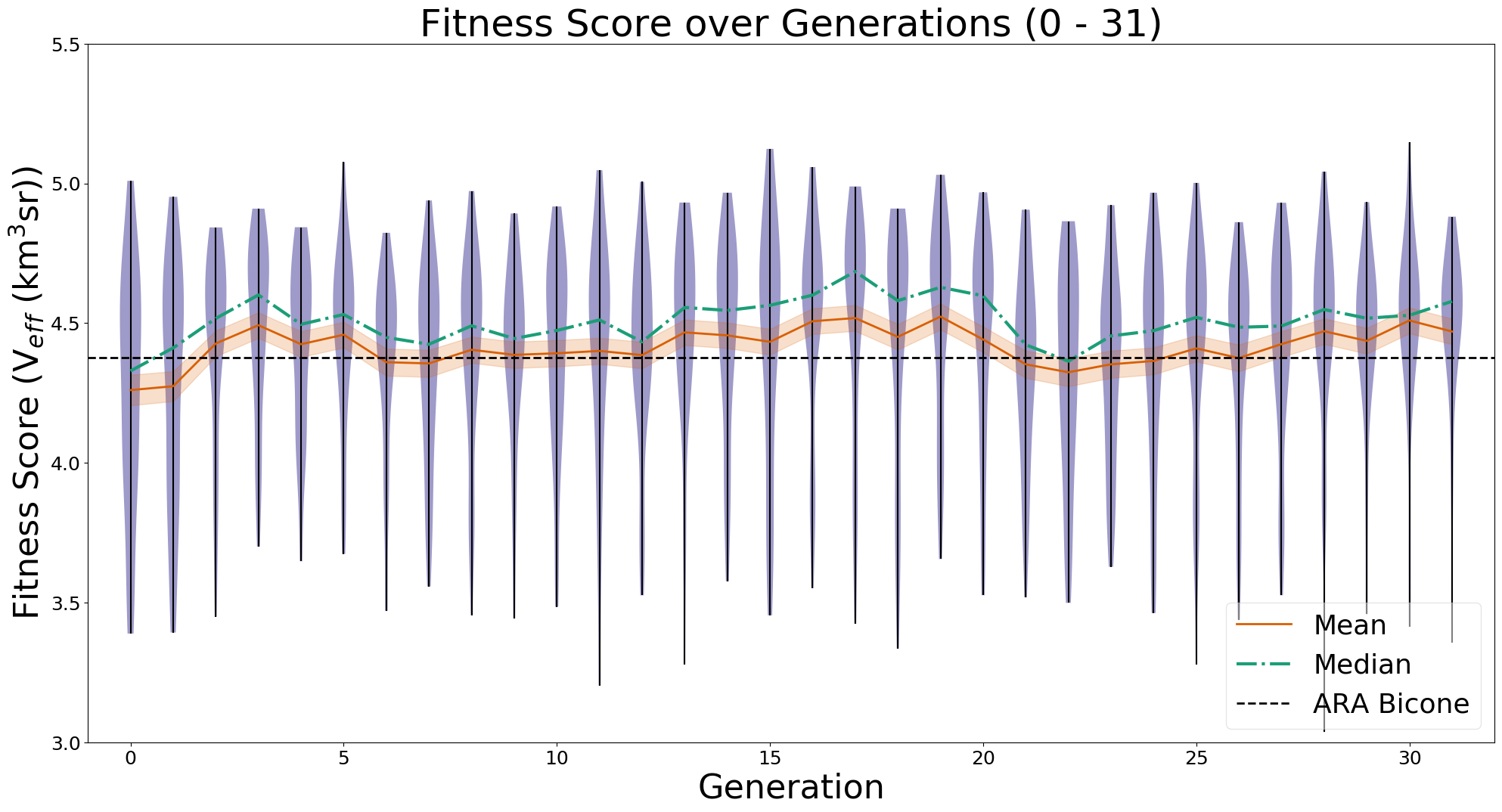
Alex M | Results from paper symmetric run | The reviewer asked us to run the loop again but for just symmetric antenna designs. We have completed that run and have results ready. We still need to resimulate the top five individuals, which I'll update this post with later. I attached the violin plot (though it should be fixed to not let the legend overlap the data). See this previous entry for the details of the run: http://radiorm.physics.ohio-state.edu/elog/GENETIS/198 |
| Attachment 1: Violin_Plot.png
|  |
|
|
Draft
|
Mon Apr 24 13:09:36 2023 |
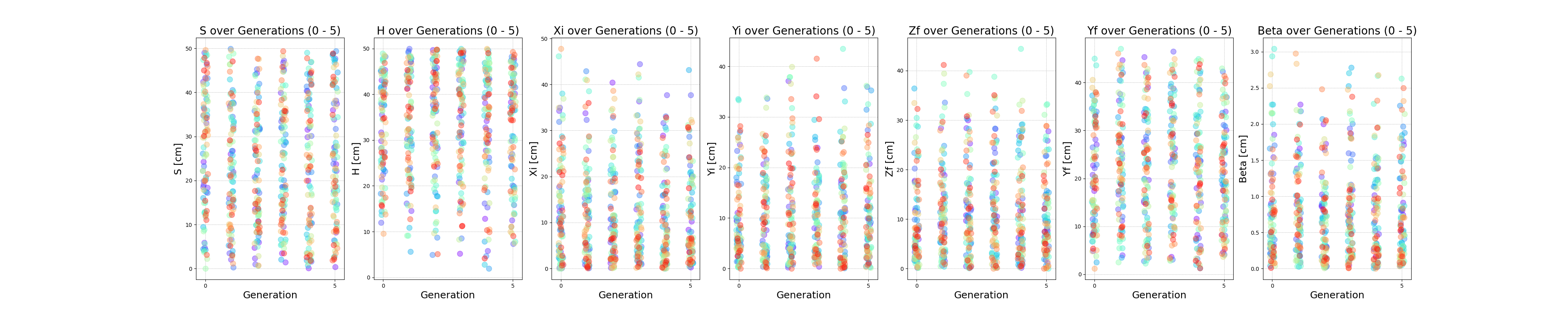
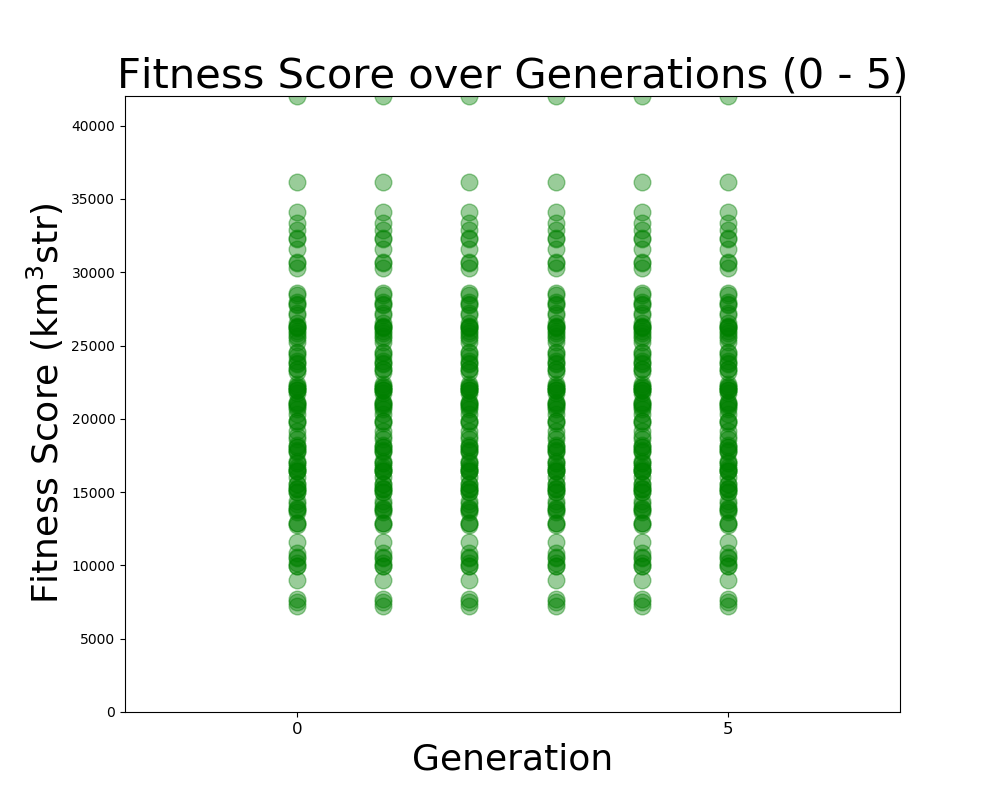
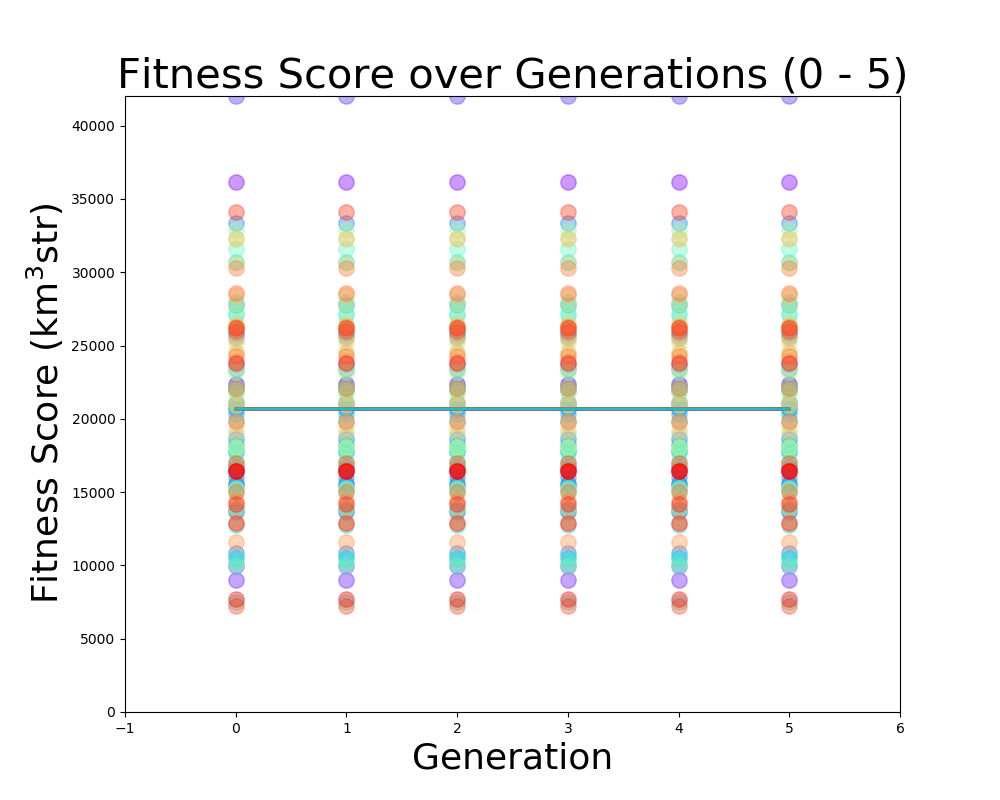
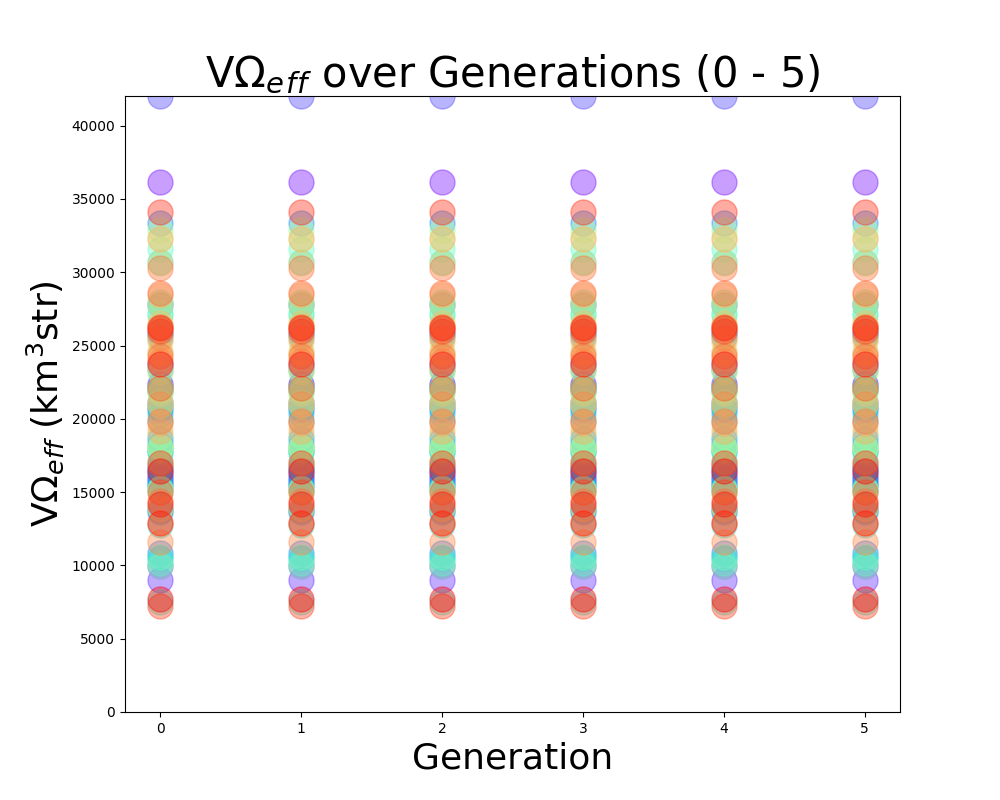
Dylan Wells | PUEO Plots Status | Plots we want to have for PUEO:
FScorePlot2D
Fitness_Scores_RG
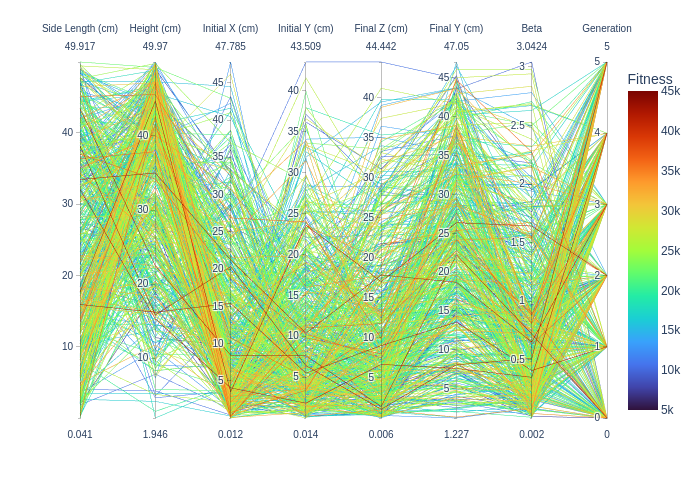
VariablePlot (PUEO equivalent of LRT plot)
Veff_Plot (currently the veff is equivalent to the fitness score for PUEO)
Veffectives_RG
Rainbow_Plot
Violin Plot
avg_freq
gain_vs_freq
polar_plotter
physics of results
Next steps:
Get the Error values out of the pueoSim root output (talking to Will)
Use output uan files from the new two-run XF simulation to test the frequency plots. (/fs/ess/PAS1960/HornEvolutionOSC/GENETIS_PUEO/BiconeEvolution/current_antenna_evo_build/XF_Loop/Evolutionary_Loop/Run_Outputs/2023_04_21_Test_6)
Implement the physics of results plots into the loop (Talk to Bryan / Dennis)
Get the average Veff/Fitness score from the default gain pattern in pueoSim to compare our results to. |
| Attachment 1: Rainbow_Plot.png
|  |
| Attachment 2: VariablePlot.png
|  |
| Attachment 3: Fitness_Scores_RG.png
|  |
| Attachment 4: FScorePlot2D.png
|  |
| Attachment 5: Veff_plot.png
|  |
| Attachment 6: Veffectives_RG.png
|  |
| Attachment 7: ViolinPlot.png
|  |
|
|
Draft
|
Tue Apr 11 00:36:49 2023 |
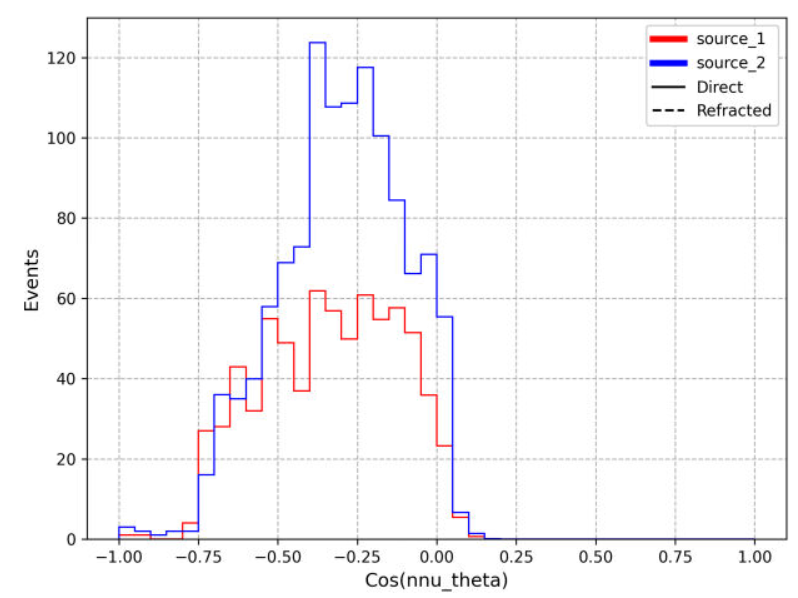
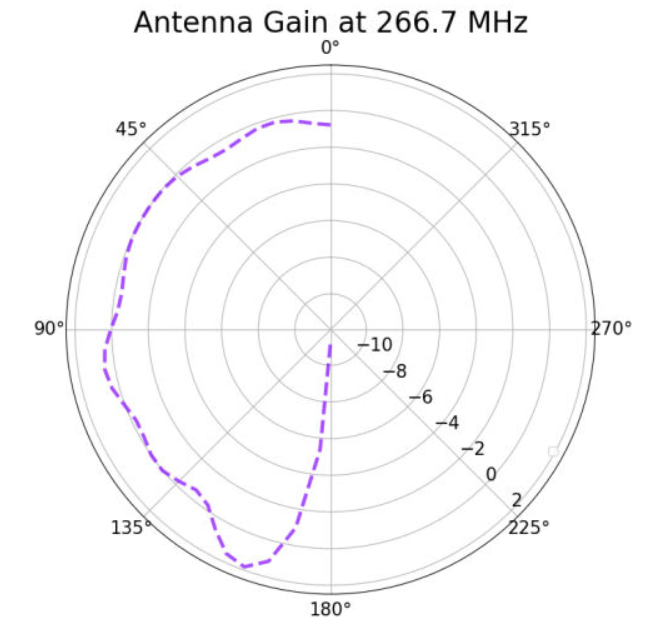
Bryan Reynolds | AREA physics of results plot first look | After some work, I've gotten the physics of results plotting script provided by Dennis working to compare the ARASim outputs from an AREA run to a set of reference data for the ARA bicone (provided by Alex). Among the outputs is a histogram of of events triggered vs cos(theta_nu) (attached here). This is the plot that was previously presented in GENETIS talks in the physics of results discussion.
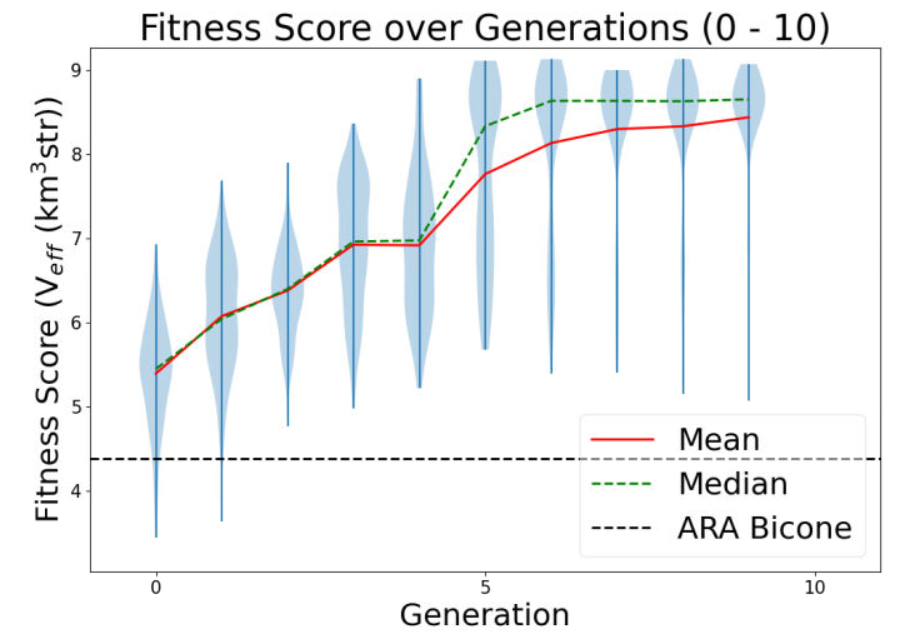
Here I compared the best individual from the AREA results (Blue- "source_2") that I have on hand (only the ARASim output files from the most recent generation ran are currently saved) with the ARA bicone reference data (Red- "source_1"). Both datasets included a total of 150,000 NNU. Note that the AREA run used was a single frequency test, meaning that the radiation pattern was held constant for all frequencies in the band.
Also attached for reference are the gain pattern of the associated individual from the AREA output and the violin plot of the run producing the data. |
| Attachment 1: 20230410_AREA_PoR_CosTheta_bestIndiv_singleFreqTest.PNG
|  |
| Attachment 2: 20230201_singleFreqTest_100NPop_fitnessPlot_10Gens.PNG
|  |
| Attachment 3: 20230410_AREA_mostFitIndivReUpload_singleFreqTest.PNG
|  |
|
|
210
|
Wed Apr 5 17:21:07 2023 |
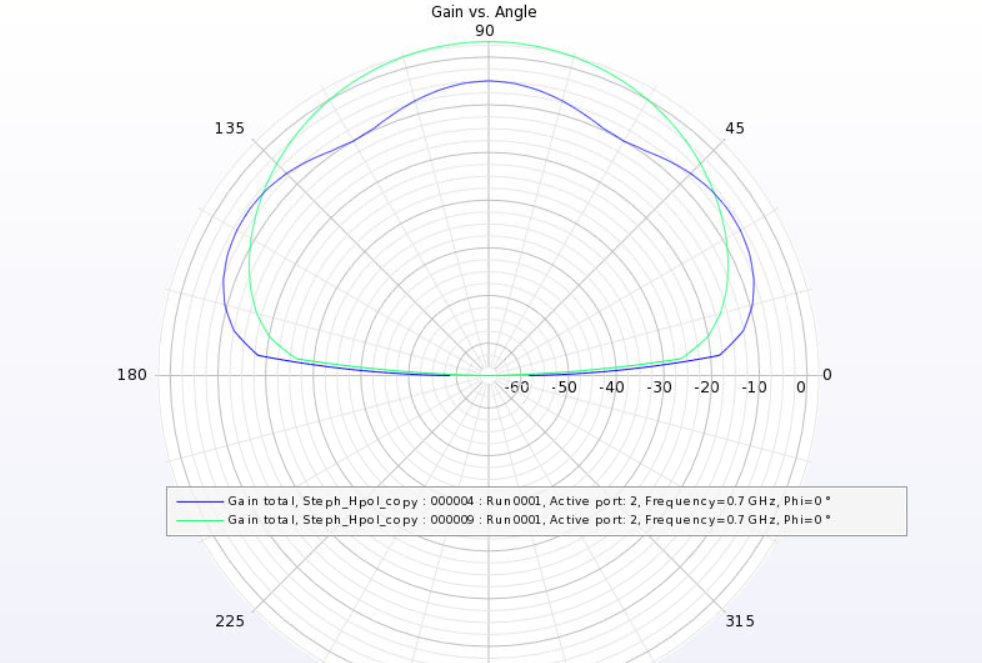
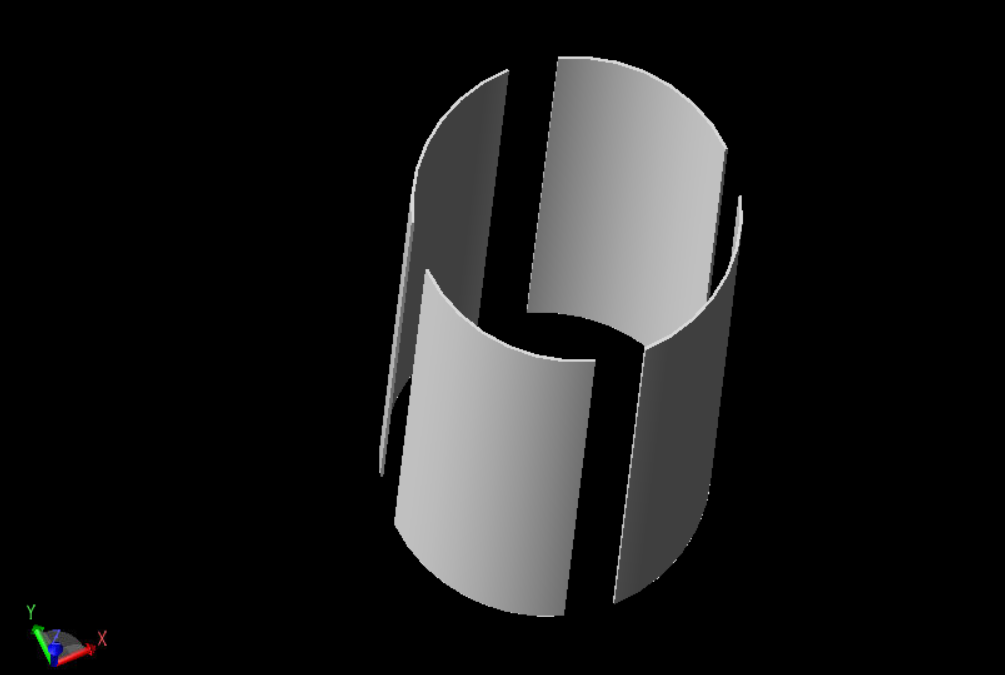
Nick King | H-pol XF Design | Work in progress. Update on H-pol XF design. The first plot is the gain pattern with ferrite rod sets (blue) vs. with nothing but the copper plates.
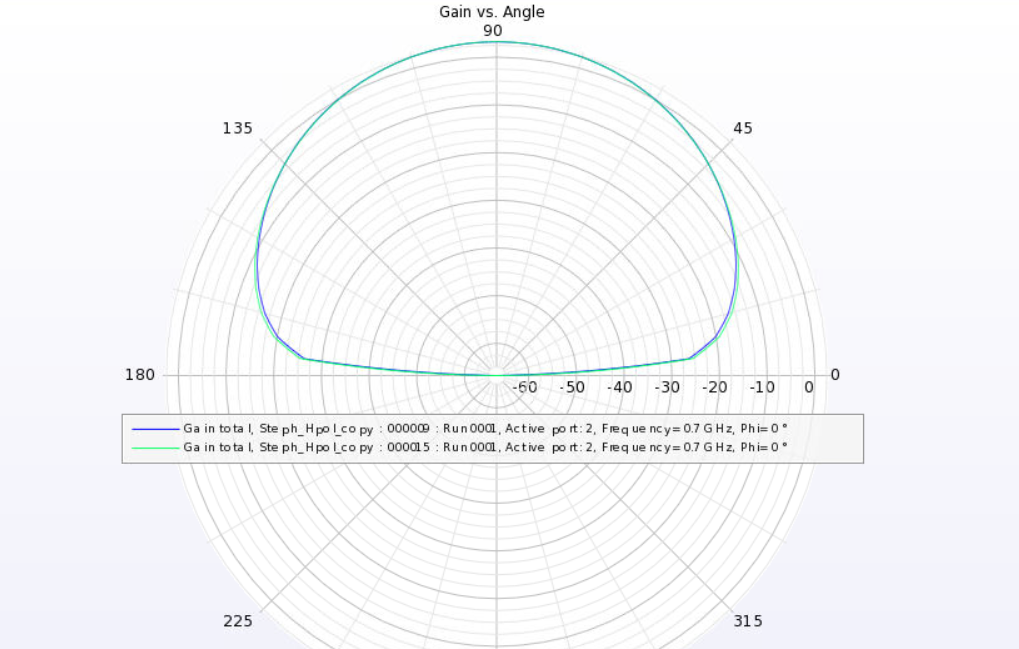
The second plot is the gain pattern with everything but the ferrite rod sets vs. with nothing but the copper plates.
The ferrite rod sets function to narrow the gain pattern. |
| Attachment 1: Screenshot_(7).png
|  |
| Attachment 2: Screenshot_(8).png
|  |
| Attachment 3: HpolfromScript(5_10_2023).png
|  |
| Attachment 4: StephHpolwith_just_copper_plates_and_wires.png
|  |
|
|
209
|
Tue Apr 4 13:51:56 2023 |
Alex M | Final To Do List for PUEO Loop | At the main GENETIS meeting yesterday, we collected the last few things that need to be worked out in order to get the PUEO loop in working order. Here's a list
-
Skeletonize the xmacros (Alex) 04/10/23 In progress
-
We need to modify PUEOsim to read in different gain files (Dylan) Changes made 04/10/23 Testing to be done.
-
Currently, PUEOsim reads in files like vv_0, vh_el, etc. It needs to be modified to take in the gainfiles as arguments and read different ones for each individual.
-
Requiers slight modification of the batch job scripts, but these are relatively small
-
Slight modification on the fitness score read in script (Dylan) Changes made 04/10/23 Testing to be done.
-
Fix Ezio's comments on XFintoPUEO.py and modify to read in outputs from two files (Jacob) 04/10/23 in progress, further work this week
-
Since we are running XF twice (once for each power source), we need the conversion script to read in from two files and print out to 8 files (vv_0, vh_el, etc)
|
|
|
208
|
Wed Mar 29 18:36:29 2023 |
Alex M | GENETIS Working Meeting Update | This is an entry for the usual Wednesday working meeting GENETIS holds. We are largely carrying on from last week's hackathon hammering out the remaining pieces that need to be fixed. See the previous ELOG post for a list of those.
Alex
Amy pointed out on the Monday call that the proper way to simulate the ANITA antenas is to use one source at a time. I modified the script I had so that it makes two simulations per antenna. The first one will use the power source connected to the "VPol" ridges and the second one uses the one connected to the "HPol" ridges. After checking this, it looks like the asymmetry I had pointed out before fell away. In other words, I think XF only wanted to use a single power source anyway. So now we should be able to produce the VV, HH, VH, and HV data that icemc and PUEOsim need.
Ryan and I also worked a bit on the slopes of the ridges. We experimented with the parameter that affects the curvature, which seems to be able to be too large. But many of the designs still look to have almost no slope and many still caved inward rather than sloping outward. We're still working on figuring out what causes that, but I think it means we need another constraint on distance of the top of the inner ridges from the center.
We also tried figuring out why the sides of the curved part of the ridges don't stay in the same plane as the straight part of the ridges. I'm confident that they do stay in a single plane (I attached a Mathematica notebook that shows as much by finding that the torsion of the curve is zero; for some reason I couldn't print it to a PDF). We think that we should be able to rotate the curve into the same plane as the straight part of the ridge, but I haven't figured out how yet.
Nick and I continued working on the HPol antenna. We want to check if there are any other things in Steph's example XF file that are significant to the results of the simulation (versus just being there as a representation of the model). It looks like there are, and Nick is working to figure out what they are by deleting them (in a copy) and generating simulation results for them to compare to the original. Otherwise, the most significant parts (the copper plates) are now being made in a script and just need to be connected to one another.
Dylan
I tried to build root from source again and ran into an error 3 hours into the build. I messaged Will and asked if he knew anything about the error. I then reran the build with Will's suggested change and ran into the same error 3 hours later. I did, however, manage to build pueo by sourcing the installation of root in Will's shared pueo directory. I'm now testing getting a txt output file from the simulation as it turns out my initial solution didn't work.
Update:
I got a working version of root installed. Also, I was able to modify pueoSim to output a veff.txt file. Now, I need to modify where it reads in the gain files, and then modify the icemc specific bash scripts to work for pueosim. |
| Attachment 1: Modeling_ANITA_Ridges.nb
|
(* Content-type: application/vnd.wolfram.mathematica *)

(*** Wolfram Notebook File ***)
(* http://www.wolfram.com/nb *)

(* CreatedBy='Mathematica 12.0' *)

(*CacheID: 234*)
(* Internal cache information:
NotebookFileLineBreakTest
NotebookFileLineBreakTest
NotebookDataPosition[       158,          7]
NotebookDataLength[    141335,       3108]
NotebookOptionsPosition[    137462,       3039]
NotebookOutlinePosition[    137824,       3055]
CellTagsIndexPosition[    137781,       3052]
WindowFrame->Normal*)

(* Beginning of Notebook Content *)
Notebook[{
Cell[BoxData[""], "Input",
 CellChangeTimes->{{3.889104537246646*^9, 3.8891045516248693`*^9}, {
   3.88910472825602*^9, 3.889104729415251*^9},
   3.889118788593347*^9},ExpressionUUID->"f2d7bf67-519b-4366-9a10-\
f19376de6bb8"],

Cell["<\
Here, I will use an example ridge that I have made and tested in XF to \
demonstrate how the curved part of the ridges slope in.
Here is a figure that represents one of these ridges. We are viewing it \
directly at the edge of the ridge, so the blue line actually represents the \
side. The purple curve should lie directly aligned with the blue line but \
doesn[CloseCurlyQuote]t. The same goes for the green line and orange/red \
lines (which do lie in the same plane, but that plane isn[CloseCurlyQuote]t \
aligned with the other side) below, which is the other side of the ridge.\
\>", "Text",
 CellChangeTimes->{{3.889118836397954*^9,
  3.889119017191614*^9}},ExpressionUUID->"0859e4b4-741b-4eea-b2b6-\
e446b9af7816"],

Cell[BoxData[
 RowBox[{
  RowBox[{"x0", "=", "4"}], ";", " ",
  RowBox[{"y0", "=", "4"}], ";",
  RowBox[{"z0", "=", "0"}], ";", " ",
  RowBox[{"yf", "=", "6"}], ";", " ",
  RowBox[{"H", "=", "30"}], ";", " ",
  RowBox[{"zf", "=", "30"}], ";", " ",
  RowBox[{"xf", "=", "zf"}], ";", " ",
  RowBox[{"[Beta]", "=", "2"}], ";",
  RowBox[{"[Tau]", "=", "0.26"}], ";"}]], "Input",
 CellChangeTimes->{{3.8891047313587914`*^9, 3.889104784350019*^9}, {
  3.889105008478373*^9, 3.889105011515078*^9}, {3.889106004732277*^9,
  3.88910602661027*^9}, {3.889112979624475*^9, 3.889112979661337*^9}, {
  3.8891130240801353`*^9, 3.889113037799301*^9}},
 CellLabel->
  "In[433]:=",ExpressionUUID->"fb3dee39-fae9-47d5-bb54-52d21df6980e"],

Cell[CellGroupData[{

Cell[BoxData[
 RowBox[{"ParametricPlot3D", "[",
  RowBox[{
   RowBox[{"{", "[IndentingNewLine]",
    RowBox[{
     RowBox[{"{",
      RowBox[{
       RowBox[{"x0", "+",
        RowBox[{
         RowBox[{
          RowBox[{"(",
           RowBox[{"zf", "-", "x0"}], ")"}], "/", "[Tau]"}], "*", "t"}]}],
       ",",
       RowBox[{"y0", "+",
        RowBox[{
         RowBox[{
          RowBox[{"(",
           RowBox[{"yf", "-", "y0"}], ")"}], "/", "[Tau]"}], "*", "t"}]}],
       ",",
       RowBox[{
        RowBox[{
         RowBox[{"(",
          RowBox[{"zf", "-", "z0"}], ")"}], "/", "[Tau]"}], "*", "t"}]}],
      "}"}], ",", "[IndentingNewLine]",
     RowBox[{"{",
      RowBox[{
       RowBox[{"x0", "+",
        RowBox[{
         RowBox[{
          RowBox[{"(",
           RowBox[{"zf", "-", "x0"}], ")"}], "/", "[Tau]"}], "*", "t"}]}],
       ",",
       RowBox[{
        RowBox[{"-", "y0"}], "-",
        RowBox[{
         RowBox[{
          RowBox[{"(",
           RowBox[{"yf", "-", "y0"}], ")"}], "/", "[Tau]"}], "*", "t"}]}],
       ",",
       RowBox[{
        RowBox[{
         RowBox[{"(",
          RowBox[{"zf", "-", "z0"}], ")"}], "/", "[Tau]"}], "*", "t"}]}],
      "}"}], ",", "[IndentingNewLine]",
     RowBox[{"{",
      RowBox[{
       RowBox[{"x0", "+",
        RowBox[{
         RowBox[{
          RowBox[{"(",
           RowBox[{"xf", "-", "x0"}], ")"}], "/", "[Tau]"}], "*", "t"}]}],
       ",", "y0", ",", "z0"}], "}"}], ",", "[IndentingNewLine]",
     RowBox[{"{",
      RowBox[{
       RowBox[{"x0", "+",
        RowBox[{
         RowBox[{
          RowBox[{"(",
           RowBox[{"xf", "-", "x0"}], ")"}], "/", "[Tau]"}], "*", "t"}]}],
       ",",
       RowBox[{"-", "y0"}], ",", "z0"}], "}"}], ",", "[IndentingNewLine]",
     RowBox[{"{",
      RowBox[{
       RowBox[{"xf", "+",
        RowBox[{
         RowBox[{"xf", "/", "[Tau]"}], "*", "t"}]}], ",", "yf", ",", "zf"}],
      "}"}], ",", "[IndentingNewLine]",
     RowBox[{"{",
      RowBox[{
       RowBox[{"xf", "+",
        RowBox[{
         RowBox[{"xf", "/", "[Tau]"}], "*", "t"}]}], ",",
       RowBox[{"-", "yf"}], ",", "zf"}], "}"}], ",", "[IndentingNewLine]",
     RowBox[{"{",
      RowBox[{
       RowBox[{"xf", "+",
        RowBox[{
         RowBox[{"zf", "/", "[Tau]"}], "*", "t"}]}], ",",
       RowBox[{"y0", "+",
        RowBox[{
         RowBox[{
          RowBox[{"(",
           RowBox[{"yf", "-", "y0"}], ")"}], "/", "[Tau]"}], "*", "t"}]}],
       ",",
       RowBox[{
        RowBox[{"zf", "/", "[Tau]"}], "*", "t"}]}], "}"}], ",",
     "[IndentingNewLine]",
     RowBox[{"{",
      RowBox[{
       RowBox[{"xf", "+",
        RowBox[{
         RowBox[{"zf", "/", "[Tau]"}], "*", "t"}]}], ",",
       RowBox[{
        RowBox[{"-", "y0"}], "-",
        RowBox[{
         RowBox[{
          RowBox[{"(",
           RowBox[{"yf", "-", "y0"}], ")"}], "/", "[Tau]"}], "*", "t"}]}],
       ",",
       RowBox[{
        RowBox[{"zf", "/", "[Tau]"}], "*", "t"}]}], "}"}], ",",
     "[IndentingNewLine]",
     RowBox[{"{",
      RowBox[{
       RowBox[{"x0", "+",
        RowBox[{
         RowBox[{
          RowBox[{"(",
           RowBox[{"zf", "-", "x0"}], ")"}], "/", "[Tau]"}], "*", "t"}]}],
       ",",
       RowBox[{"y0", "+",
        RowBox[{
         RowBox[{
          RowBox[{"(",
           RowBox[{"yf", "-", "y0"}], ")"}], "/", "[Tau]"}], "*", "t"}]}],
       ",",
       RowBox[{"[Beta]", "*",
        RowBox[{"Log", "[",
         RowBox[{
          RowBox[{
           RowBox[{"t", "/", "[Tau]"}], "*",
           RowBox[{"(",
            RowBox[{
             RowBox[{"Exp", "[",
              RowBox[{"zf", "/", "[Beta]"}], "]"}], "-", "1"}], ")"}]}], "+",
           "1"}], "]"}]}]}], "}"}], ",", "[IndentingNewLine]",
     RowBox[{"{",
      RowBox[{
       RowBox[{"x0", "+",
        RowBox[{
         RowBox[{
          RowBox[{"(",
           RowBox[{"zf", "-", "x0"}], ")"}], "/", "[Tau]"}], "*", "t"}]}],
       ",",
       RowBox[{
        RowBox[{"-", "y0"}], "-",
        RowBox[{
         RowBox[{
          RowBox[{"(",
           RowBox[{"yf", "-", "y0"}], ")"}], "/", "[Tau]"}], "*", "t"}]}],
       ",",
       RowBox[{"[Beta]", "*",
        RowBox[{"Log", "[",
         RowBox[{
          RowBox[{
           RowBox[{"t", "/", "[Tau]"}], "*",
           RowBox[{"(",
            RowBox[{
             RowBox[{"Exp", "[",
              RowBox[{"zf", "/", "[Beta]"}], "]"}], "-", "1"}], ")"}]}], "+",
           "1"}], "]"}]}]}], "}"}]}], "[IndentingNewLine]", "}"}], ",",
   RowBox[{"{",
    RowBox[{"t", ",", "0", ",", "[Tau]"}], "}"}]}], "]"}]], "Input",
 CellChangeTimes->{{3.889104789299713*^9, 3.889105080982005*^9}, {
   3.88910513362922*^9, 3.889105134787335*^9}, {3.889105176753415*^9,
   3.889105183526766*^9}, {3.889105234070648*^9, 3.8891053106544733`*^9}, {
   3.8891053894877863`*^9, 3.889105467143161*^9}, {3.889105814148295*^9,
   3.889105946276293*^9}, 3.88911016079349*^9, 3.889111844551866*^9},
 CellLabel->
  "In[434]:=",ExpressionUUID->"a2747aaf-59c9-498b-a918-186b6556d2ae"],

Cell[BoxData[
 Graphics3DBox[{{{}, {},
    TagBox[
     {RGBColor[0.368417, 0.506779, 0.709798], AbsoluteThickness[2],
      Line3DBox[CompressedData["
1:eJwVjHk41Isexh1ahha/2fyQiIZkG2Mf/JrXcitCi4RzSUI8t1G3EUqbJCod
RyqpQ9f2KGSo64QkmpTUTWWP0mI5kVD2/c75432+z/t5Pu9Xc+/BHUGyMjIy
rtLISePx7o+1MjIEVK0qZf++4511NZyEnA0FF57G6NEINETP1GdIedNN5aN2
bTGCX2yHPu8kCFyo4/9h9wsBsF/vVW5LFohv2mfkrSEw/et90zOyBCK25bfK
tWUJlgT2qbnbEXh3oihwyWIC9EEyear1nqB00EIpN4ZA6pPMZ8sVCHx86HZw
tFUiUFnUQHNZTIfS1rgLKiwCGzn9H360Ngg+GNEGrykwQN+3lWGqS2Cq1fLq
cOsXgc6zO10cOxaCzj6S1LoTkDjcynmbNSKoD35xUmeHEmaXilYfPU5g1cfy
3r0Gc4KJNxkptV7KOC/apLE7hwBT6Je/1EEOn44VvfNNUMXh+qnHOa8JJPE2
Vrh50KDHs5SEpKoh87fhlbRJAq2pxtU/iBUw051oDnmrDv0NNbP/W0tHQs6p
17IqdPiNWJouil6DOy3ll5660UFe6Tp/OZ2JplZjt8RYTRxsGHnTHkFH/E6n
DQ3jbOh9eDrP+I8WkqoU7m7PoiOMn+lXF6MMcTAp25C7FqOK+2x6XtDhODQd
daBLFaMeT5/syePAdXOX8M5POmJst/urWq2GapDiqv7H2lgkogTNqxmwEV8v
OVmlgQNT7KeFtTqYm++oUN3IgHDyR/TzFZrIEZctEnatw84Tnu8eH2JgUp/o
NPTQwvXaUtnpKV1kdo2mp6UxYF1wJyMlZS0eBYW5S+bWg1fYsvxKDQNDDOc9
uyQc1HBe8s+S+lAPuar2fYiBLxf37BIt1cFUyEdRjLoB3OJSW/YqM7FpKNKp
x2IdiPrf7aJsDNFx9QjP2pGJbwG0sJJTuuhNSau3czfC7t+iTP9xkAlHDikb
L1mPge4gsYMXF5yv1R+F15ggXukkFg/poS+vh57BN8Zms26DcQkTq84VbbOw
MMBo9nh4RaUxxF1bOGnfmLimzyeYwYb49Nq8fIOAB4VjzZJwJgsvVO3MRy4Z
wXa5w6aqlzzUyNnK3t3AgrWaJInbwgU3QTz/3s0E1UO932jBLCjKZR32jzFG
supXmcn3JlB9dSBCksyCxmkNW28dHlo6tn6JCjHFv5KVbxdVsrBc2+f+jloe
/vuR/f1GvylmHyyJLe9hgUepFEX6mmBhJM++LNIMA01vZbTpbIR3Mp44y5ii
yzntsWjGDOo7Pq8r5LPxc+Sih1OqKW41PtS4etwcm0oZ4yH+bDhzn91wMjRD
h7DgeQnNAq9WaAbFXWRDMmIzM1FvhlubJ28cSrBASm3YyeoSNkQGJu1vg8zR
ZcYs01exxENRtpXPJzbsBwObvOUtUBZwcT4m3RLap8l0lrwSnDnKriuyLCCs
MeXYa1ghNrLwtgxPCUbRF45ILC2RZJ53Zb7ACvBb4+HmowTjIH6VdrslXPqO
G3lx+RDktxaUxSpB+CgktuSQFY4WqjOLKvlI692fHVushNqMpsAfbD7isgdb
Qp2sMaigZR/boYS52wsT3FI+9N6r1dS9tMaZZLWEDDkSQu0C+Ruu1hBoq8xq
edsgYtnoYXUuiRm9yxb3hq0xUBzmq/LBBgV/KcqXe5KQ5Mx8HjtngyMHZtMj
d9uipcDVMf4UiUDHtbBRt0W4rfv6xn5b+PmHrCnNJ6EdGl9uVG0LeVda58tQ
CnpRtblyjSQ0FIR3XT0pzP0uFLP+TWFvsGZqqZSLHU5EDXtTGGx4c9JXRCF1
57Hz+5tI2JxIdLjsQ6HR67rGUASFJVyusLGZhOdwcXObP4X0QD1/RjSFL10p
vOw2EoktY1MBQgq84y7dXskUrrvue2jfSWI+65R91GkKvxYk9ffcp0DTXNxw
uo9Ep83lxtwCCi6Dow+MyikIVvo9Me8nsT88J81JLO0874TICgoRM2UlfVI+
Lf4zaKCYgnappoF8NYXuZuG17QMklLXaJnjSv0OSe6EGdRSqLzT5aA6R2Epb
rVYp9c60Nw2LOihEjmb/VT1KoqopN7CxWfp3Nf9xxQcK4s9zbYfHSLitLDOM
aKMQsif90qJPFHrqPV/ojpPo2FQ3rizdu/YGmaR0U3DPW1aYNEFi4sG3c7ul
HvlzPKz8OwWj3WGiPdMkjDKNC/v6KSiY/9NRdpjCvi2vAlgzJCrb7SIuSr3Z
yCrWlp8U0qzWeTyXcmeWu4Ar9T7Pxf/5fly6Y3ZYGs+R2Bcf/vbwGIUmDJzV
nqJgJ2O+vlvKx6rjbpCTFJ6d2bbrwAyFI98TVVPnScRMXwt4ME2h9FmJTukc
haL2r8tcFkgomuUZ+Ep7vrzKxMIChd5a+7kFKb8Z+mDs7/5/SZ4y2A==
       "]]},
     Annotation[#, "Charting`Private`Tag$112685#1"]& ],
    TagBox[
     {RGBColor[0.880722, 0.611041, 0.142051], AbsoluteThickness[2],
      Line3DBox[CompressedData["
1:eJwVjHk81Psexh1UQ4vfbH7IEs1ItjH2YX7Nx3IrQouEc0mWKa/bpNvYSpsk
CseRCjl0bS8lGdV1siXfJpG6qewRkuVEQtmX4c754/njeb/ez6MdcPIAX1ZG
RsZVGjlpPD7+sVVGBgM16xopxtBsb2MdI7FgR3HCyxh9EgbN0UtNOVLeekfl
jF1nDO8X7kT/QQyDhEbOH3a/YAjo7wJUOlN5ojv2OUVbMFj89YnZZVkMRey7
3yHXmcdbGzSi7m6HwcfzpUFr12CIPI6nLnQ85pWPWyoXxmCQ8SK3foMihvqe
up2c7hDzVOWbSS5ryKC8Ny5BlYahnYzRnh8dzbweY9J4uiIFyEf3Usz0MLTQ
YXVrsuMLT7f+wQDDjgb8K8/EDe4YEjvcLfiQN8VrOvb6gu4BZVheJ9Q4cw5D
m/sqhwMMJby59zlpDV4qcE24S+twAYaoAr/76xzk4PPZ0o++iWoQ1rTwvOAd
hlLYO6vdPEigz7YSB2eoQ+5vk5tI8xjqyDBBP7CNYK431xb8QRMMdtQt/28r
GSUWXHwnq0oGvykrM/noLfCgvfL6Szcywm8OXLuRTYXWDhO35FhtONk89b4r
goziDzrtaJ6lg37PyxXKf3QgpVbx0f48Mgrl5Po1xqiA6Bgu21y4FaaVjtoO
vSYjx4nFqJABNZj2ePniSBEDXHcPCB78JKMY7n5/NWsNUOMrbR59zgR5IcFr
06AgW9Htsgu1WhCyQH9Z0qALkpXuarWdFCSY/xH9aqM2FIgq5AUD2+Dgec+P
z09R0LwB1mvkoQO3G8plFxf0IHdgOjsri4Jsih/kpKVthWf8UHexZDuwS9o3
3KyjoAmK85FDYgbUMd5wruAGoBl8S/37BAV9STpySLhOFxaC+4QxmobgFpfR
HqBCRbsmIp2GLLcB1vS7XZStEXTfOs22caSib4Gk0LKLejCcltVk524Mh3+L
MvvHSSpyZOCy8eLtMDbIFzl4sYDxFfUJ0qkIe6ub/HBCH0aKhsg5HBPYbT5o
OCumos1XS/dZWhrCdP5seHWNCYgG9jCyvlFRugEHox4zgs/vLCp38NigeLZN
HE6loddqdhZT142Bu8FhV+0bNtTJcWUf7aAhG3VxCqudBaxE0conN1NAE8Pf
SMdoSEkuL8w/xgRS1b7KzH8yBbW3IRHiVBrSuqTF9dZlQ3v33i9RwWbwr1SV
e6U1NLSB6fPkQAMb/ttH/545agbLVWtjK4doiE2olkb6msLqVJF9RaQ5jLV+
kGGS6Si8l/LCWcYMBpyznguXzEHzQP+2Eg4d/ZxK8nDKMIO7LU+1bp2zgF3l
lNlgfzpyZtVnOhmZQ7eg+FUZyRLebtTmxyXRkXjKdmmuyRzu7p7PPJVoCWkN
oRdQGR0JDU27PvAtYMCcWmGgagVPhfnWPp/pyH48qNVbwRIqApNWYrKtgHkJ
z6YpKCNnhorrxjxLENSZMey1rCE2suSeDFsZGUcnnBZbWUGKRdHNlWJrAL8t
Hm4+ysiEz6lldlmBy8g5Yy8WB3j3O4orYpWR4FlwbNkpazhTokktreFA1vDx
/NiHyqghpzXoB50Dcfnj7SecbGBcUcc+tlsZSe6tzrHKOaD/Sb2u8Y0NXE5V
T8yRw5GAWayQ6WoDPKbqso63LUSsnw7TZOFoSf+G5eNJGxh7GOqr2mMLxX8p
KVR64khcsNQ/c9UWTocsZ0ce5kJ7satj/EUcBTluBVtNLoRz3be3jHLBzz94
... 2817 more lines ...
|
|
|
207
|
Mon Mar 27 13:10:02 2023 |
Alex M | GENETIS Hackathon Summary and Next Steps | This entry will serve to summarize what tasks we've completed and still need to complete after last week's GENETIS hackathon.
Alex
My focus was on the XF scripting for making the PUEO antenna. Before last week, we had a script which made the geometry of a PUEO-like antenna. The xmacro script has been modified in the following ways:
- Now includes power sources connecting the ridges that are opposite each other.
- Generalized to use variables without hardcoding.
- Reads in data from the output files of the PUEO GA.
- Loops over all read in antennas to set up all of the simulations at once.
At this point, the script for setting up the simulations of the PUEO loop is just about ready for use. The only change to be made is to the frequency list. The script for printing out the gain data is also ready, though it only prints out the gain in theta and phi, not the cross polarization.
Here are some outstanding points that need to be hammered out, though they impede the quality and accuracy of a run rather than the actual functioning of the loop.
- The shape of the ridges in the generated antennas from the GA are considerably different from the PUEO antenna.
- This is likely something that can be fixed by adjusting the constraints--the subspace of the parameter space that leads to PUEO-like ridges may be very small as-is.
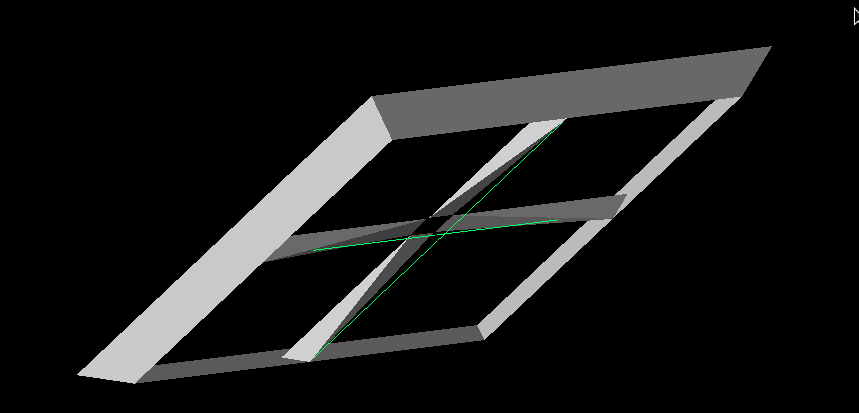
- You can see an example of an antenna from the GA attached (viewed from slightly below). It looks dramatically different. This seems to be due to constraints on the height and width being too small, but the ridges are also clearly misshapen.
- The curve on the ridges looks like it needs some work.
- For very PUEO-like antennas, the slopes look reasonable, but they do flare in or out slightly. This is more dramatic for ridges that deviate from PUEO's significantly.
- My best guess is that the parametric form of the curves is placing the curves in a plane that is different from the rest of the ridge. This should be fixable by somehow constraining the curve to a given plane.
- The simulation still only outputs polarization data for theta and phi, not the cross polarization.
- It looks like XF naturally gives us the theta and phi polarization. It's not clear how to get the cross polarization gain (which we think means the gain when the signal is at 45 degrees).
- One idea is to redo the simulation but with the antenna rotated 45 degrees in the azimuth. But I'm not certain that that iwll work.
- Amy indicated that the correct way to do this is by simulating the antenna with just one power source at a time.
- Leaving the VPol source would produce the VV and VH data and leaving the HPol would produce the HH and HV data (HV and VH could be flipped!).
- Currently, the antennas have a fixed opening angle. We'd like to add this as a parameter, though at the moment it might be ok to forego that.
- We need to make sure that the power sources aren't too close together (fixed!).
To do for this week:
1. Modify the script to make two simulations for each antenna, each with only one power source.
2. Adjust the constriants on the parameters to fix the curvature.
3. When we begin a run, we will want to just evolve the height and the inner side length (these determine both the inner side length and the outer side length).
Dylan and Jacob
Dylan and Jacob focused on getting PUEOsim/icemc working, which will be the simulation software needed for the PUEO loop. Here's a summary from Dylan:
- Plotting and bash scripts should be mostly good to go.
- Currently have 4/5 of the PUEO prerequisites for pueoBuilder, and the GENETIS-specific code is ready to implement and test when it's built. I’m trying to build the correct root version one more time before today’s meeting, and if it fails again I’m going to ask Will.
- The main thing left is to get the correct version of root installed, which while annoying, shouldn't take too long
To do for this week:
1. Once PUEOsim is working, run it with the usual settings to get the default performance. It will need to be submitted as a job array (ask Alex for help with this if you need; ask Will for advice on how many neutrinos to run).
|
| Attachment 1: Weird_PUEO_Model.png
|  |
|